



Gina Lucia


Allow individual vendors to sell their delivery and pickup goods via your website with both Orderable and the most popular multi-vendor plugins, Dokan and WCFM.
With this Orderable multi-vendor compatibility update, you can assign locations to specific vendors and allow them to set up open hours, pickup/delivery services, lead time, holidays, and more.
Curious? Here’s what Orderable multi-vendor compatibility can do.
Take a closer look at Orderable multi-vendor compatibility
Compatibility with Dokan and WCFM
Doken and WCFM both allow you to create detailed multi-vendor marketplaces in one WooCommerce store. With either one of these plugins you can launch a marketplace, and give each store their own dashboard so they can upload products, set their own shipping, view reports, and more.
The best part? You can set a commission for each sale, making setting up your own online marketplace a breeze.
But what if you want to allow vendors to get more specific with:
- Pickup/delivery time and date slots.
- Lead time.
- Holiday dates.
- Maximum orders.
- Opening hours.
- ASAP delivery.
- and more?

By using Orderable and one of these multi-vendor plugins together, you’ll be able to do exactly that. Vendors will be able to use Orderable‘s Locations feature straight from their dashboard. Giving them the freedom to create their own location and customize each one of these settings.

Assign Orderable locations to specific vendors
As the site admin, you’ll have the option to assign specific locations to vendors. This means you can get the ball rolling by creating vendor Locations yourself and assigning them directly to vendors for them to customize.
To do this, you’ll use the Edit User screen in WordPress and assign a location there.
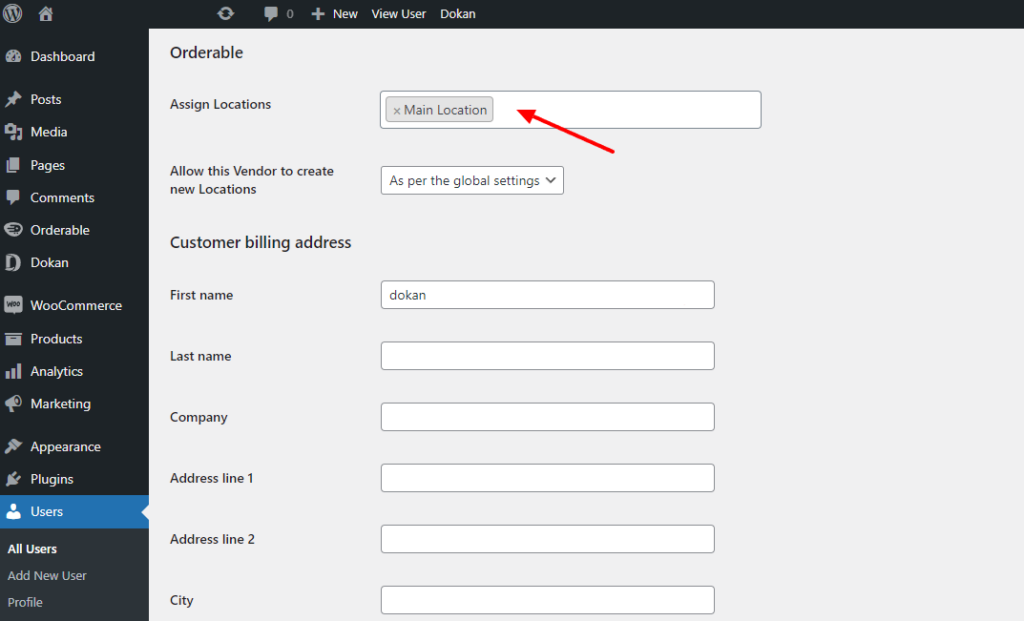
Control what vendors can do
To give you more control as the site admin, you’ll be able to decide what your vendors can do with the locations feature.
You can decide:
- If you want vendors to create locations for themselves. If not, you still have the freedom to create and assign them yourself.

- Whether you want to prevent individual vendors from creating their own locations. For example, you could allow all vendors to create their own locations, but for an individual vendor, prevent them from doing so.

- If you want vendors to edit Location settings for ones assigned to them only (this is the default setting), all Locations in the marketplace, or not allow this at all.

How to get Orderable Multi-Vendor Compatibility
If you’re already using Orderable Pro, you can update from the WordPress Dashboard as usual.
Want to see how to use Orderable Multi-Vendor? Here’s a step-by-step doc:
If you don’t already have Orderable Pro, upgrade your store by getting Orderable Pro for yourself here:
Get Your Marketplace Online With Orderable
The WooCommerce plugin designed to help you take orders online – with no added fees!

So, what do you think of this exciting new update? Let us know in the comments. If you have questions about our multi-vendor update, we’d love to hear from you.
Gina Lucia is our in-house Content Manager at Orderable. She writes articles, user guides, technical documentation, and creates videos on everything WooCommerce and Orderable.
Gina has been working in the WordPress/WooCommerce space since 2012 when she developed WordPress websites for clients large and small.
For the past 8 years, she’s been writing about everything WordPress and WooCommerce, becoming an expert in what makes a WooCommerce store succeed.
When not writing, Gina loves to tend to her vegetable garden, read, or travel to mainland Europe.
Don’t miss out on the latest Orderable news!
Sign up for our newsletter to receive the latest news from the blog, you’ll get pinged every week with a digest of the latest updates.
[fluentform id=”6″]

Related Articles

How to Increase Restaurant Sales Without Advertising in 2026

How to Create Online Ordering for Your Restaurant

10 Online Menu Inspiration Ideas
Get Your Restaurant Online With Orderable
The WooCommerce plugin designed to help restaurants take orders online – with no added fees!
View Pricing

