



Dave Green


Receipt printing, the way it should be – fast, built-in, and completely free in our latest Orderable update.
With Orderable Receipt Printing, you can now generate and print receipts and tickets straight to your local printer. Whether it’s physically plugged in or wirelessly connected, as long as it’s available to your device, you’re good to go. No extra plugins or complicated setup needed.
This powerful new feature is available in the free version of Orderable, making it even easier for new users to get started.
Curious? Here’s everything you can do with Orderable Receipt Printing.

Take a closer look at Orderable Receipt Printing
Say goodbye to third-party printing tools
Until now, Orderable users have had to rely on third-party plugins to handle local order printing. Others were simply printing the entire WooCommerce order page, which isn’t exactly optimized for kitchen use or delivery management.
With this new feature, you can ditch those workarounds. Orderable Receipt Printing offers a clean, lightweight solution built on top of WordPress and WooCommerce. Allowing you to print order receipts and tickets that suit your business.
Built-in receipt printing (how it works)
Orderable Receipt Printing integrates directly into your existing order workflow.
Here’s how it works:
- Create fully customizable receipt layouts using the WordPress block editor or choose from four pre-built receipt templates: Kitchen Ticket, Delivery Driver Ticket, Packing Slip, and Order Confirmation.

- Add and edit key order details using specialized Orderable blocks:
- Order Number, Payment Method, Totals.
- Line Items, Customer Info, Shipping/Billing Details.
- Order Notes, Meta Fields, and more.

- Style your layouts with custom labels, colors, spacing, and design tweaks.

- Assign a default layout in your settings to enable one-click printing from the WooCommerce orders screen.

- Print receipts for any order directly from the Live Order View, WooCommerce Order, or Edit Order pages.

When you click Print Order, a print-friendly window opens with your layout, and the print dialog automatically appears – ready to send to your local printer.
A flexible layout builder
Each receipt layout is built using the WordPress block editor, giving you full control over the structure and design.
Whether you want to highlight specific order details for your kitchen team, create packing slips for fulfilment, or design branded customer confirmations. You can do it all with the drag-and-drop block editor.
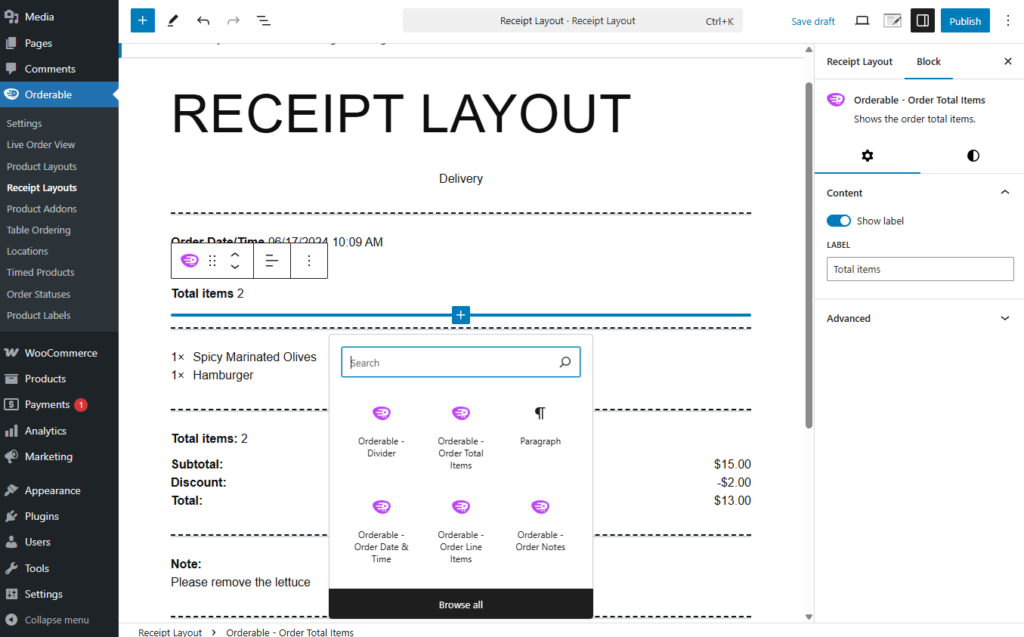
Don’t want to start from scratch? Four ready-made block patterns are automatically installed with Orderable:
- Kitchen Ticket
- Delivery Driver Ticket
- Packing Slip
- Order Confirmation

Set a default layout for quick receipt printing
To save even more time, you can set a default receipt layout from your Orderable settings. Once selected, a quick print icon will appear on the WooCommerce Orders screen and Live Order View.
Clicking this icon will automatically generate a printable receipt using your default layout – perfect for busy kitchens and delivery teams.

Prefer to print a different type of layout (e.g., delivery driver vs. kitchen ticket)? You can do that, too. From the Edit Order page, click the drop-down arrow next to ‘Print Order’ to choose from your saved layouts.

How to get Orderable Receipt Printing
Orderable Receipt Printing is available right now, and it’s part of the free version of Orderable.
Want to see how to use Orderable Receipt Printing? Here are some step-by-step docs:
Get Your Restaurant Business Online With Orderable
Orderable is a user-friendly WordPress plugin that adds online ordering to your restaurant website.
Add your dishes, create your online ordering menu, customize your delivery schedule, and manage orders with ease.


Dave is an experienced WordPress and WooCommerce professional with over a decade of building solutions in the agency world, who is now focused on commercial plugins and SaaS products.
He joined Orderable in November 2021, contributing to the ongoing feature and maintenance development of Orderable in addition to his other duties as lead developer on plugins such as Iconic’s WooThumbs, before taking over as Product Manager of Iconic & Orderable in November 2023. In August 2024, Dave stepped away from development duties to focus on growing Iconic & Orderable.
Don’t miss out on the latest Orderable news!
Sign up for our newsletter to receive the latest news from the blog, you’ll get pinged every week with a digest of the latest updates.
[fluentform id=”6″]

Related Articles

How to Increase Restaurant Sales in 2026

6 Restaurant Revenue Streams to Utilize in 2026

Restaurant Curbside Pickup 101: A Guide for Restaurant Owners
Get Your Restaurant Online With Orderable
The WooCommerce plugin designed to help restaurants take orders online – with no added fees!
View Pricing

