



Dave Green


Hello from Orderable HQ. We’ve been working this month to bring you some updates we think you’ll love. We’ve got some new features, some highly requested, and a few bug fixes, with more to come soon.
💡 Got any suggestions for future updates? We’d love to hear them! You can submit your feature requests through your account.
Updates to Orderable (Free)
Automated email order reminders
This month, we’ve got a new feature specifically designed to save time, so you don’t have to send emails back and forth with customers.
Let’s say your customer didn’t set a delivery/pickup date when checking out. Or, they use Google/Apple Pay, so can’t pick a time slot at all. Getting them to pick a slot after checkout can be a pain.
So, we’ve created Order Reminders, which allow you to send automated email reminders to your customers, asking them to pick their slot. The email contains a link that sends them to the order received/thank you page. Here, they’ll be able to pick their slot.
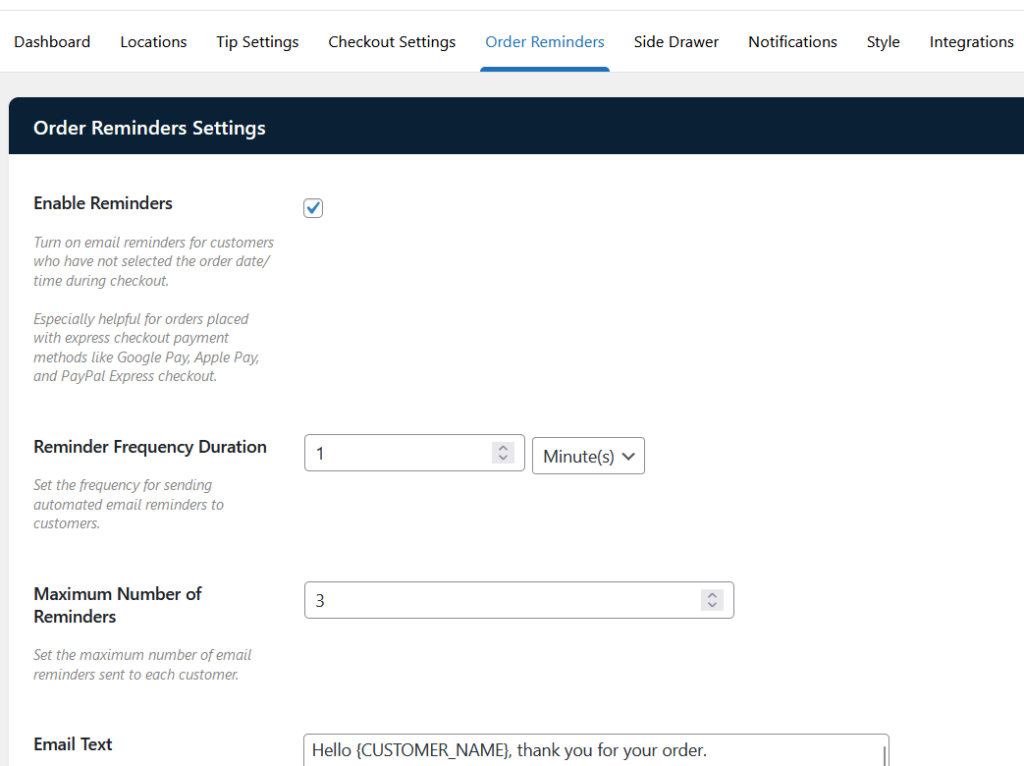
These emails are set at a frequency of your choice, and you can customize them to suit your store.
Want some extra information and a guide to setting this up? Take a look at our time slot reminders guide.
Of course, that’s not all. We’ve made several other fixes and updates, which you can read in the Orderable Changelog.
Updates to Orderable (Pro)
Pause delivery and pickup orders
Let’s say your store suddenly encounters an issue. You’ve run out of stock, you have to close at short notice, or you just can’t take any more orders for the day.
To cover this, we’ve just introduced a feature that allows you to pause and resume delivery/pickup orders with the click of a button.
These buttons can be found on both the Live Order View page and the Locations page. If you have multiple locations, you can pause delivery and/or pickup orders for each or all of them.

When paused, customers will see a message at the checkout rather than the normal date/time picker.
If you still want customers to be able to place orders for future dates, you can use the Preorder Days feature. Setting this to 1 will allow customers to select Tomorrow as their order pickup/delivery date.
Want some extra information and a guide to setting this up? Take a look at our pause orders guide.
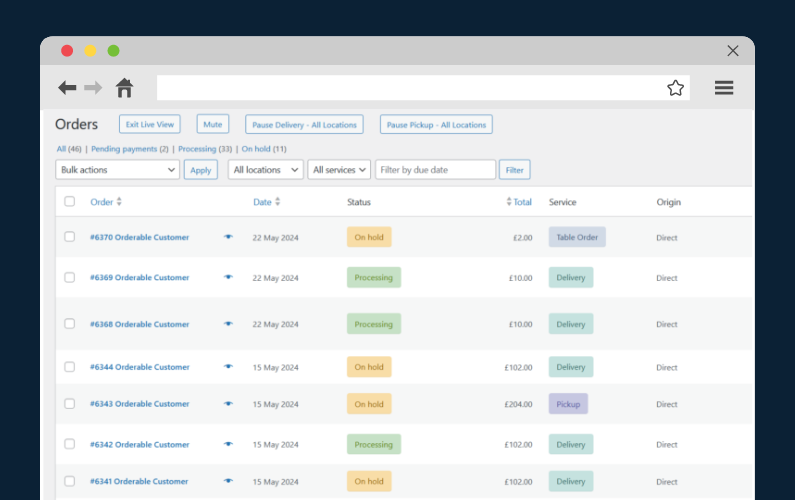
Filter by table service on the Live Order View page
When filtering orders in the Live Order View or Orders page, up until now you’ve only been able to filter by Delivery and Pickup.
With this update, we’ve added Table Order to the filter options. This means that in-house staff can see the orders they need to fulfill without the clutter of pickup and delivery orders.
We’ve made several other fixes and updates. You can read all of these in the Orderable Pro Changelog.
How to get the updates
If you’re already using Orderable, you can update from the WordPress Dashboard as usual.
If not, you can get these new features by getting Orderable for yourself:
Get Your Restaurant Online With Orderable
The WooCommerce plugin designed to help restaurants take orders online – with no added fees!

Dave is an experienced WordPress and WooCommerce professional with over a decade of building solutions in the agency world, who is now focused on commercial plugins and SaaS products.
He joined Orderable in November 2021, contributing to the ongoing feature and maintenance development of Orderable in addition to his other duties as lead developer on plugins such as Iconic’s WooThumbs, before taking over as Product Manager of Iconic & Orderable in November 2023. In August 2024, Dave stepped away from development duties to focus on growing Iconic & Orderable.
Don’t miss out on the latest Orderable news!
Sign up for our newsletter to receive the latest news from the blog, you’ll get pinged every week with a digest of the latest updates.

Related Articles

How to Improve Slow Season for Restaurants
10 Irresistible Restaurant Menu Ideas for 2026
How to Set up QR Code Ordering for Your Restaurant
Get Your Restaurant Online With Orderable
The WooCommerce plugin designed to help restaurants take orders online – with no added fees!
View Pricing


