

How to Sell Food Online in 2026

How to Sell Food Online in 2026

Gina Lucia


If you want to know how to sell food online this year, this guide will walk you through the essential steps to start making money online.
Many people buy food products online, making it a great business opportunity. You only need excellent food inspiration, the right systems, and the drive to see it through.
If you already have an idea and the drive but don’t know where to start, we’re here to help. In this guide, we’ll discuss legal considerations, platforms, and strategies to start building your online food business empire so you can put the right systems in place.
Here’s what we’ll cover:
- Whether you can legally sell food online and what you must do first.
- The best platforms for selling food online.
- How to set up an ecommerce website with WooCommerce and Orderable for food delivery and local ordering.
- Packaging, labeling, and food safety considerations.
Ready to get started? Let’s begin with some legal considerations you have to handle first.
Get Your Food Business Online With Orderable
Orderable is a user-friendly WordPress plugin that adds online ordering to your website.
Add your dishes, create your online ordering menu, customize your delivery schedule, and manage orders with ease.


Can you sell food online?
Yes, you can start selling food online. Different platforms let you set up a food store, take orders, and deliver food to customers.
But selling food is different from selling other products. Since it directly affects public health, each government has typically strict laws for the food industry to follow to ensure food safety. So, before launching your new business, you must meet these local regulations to avoid fines, shutdowns, or worse.
Let’s break down some of these requirements for your startup.
Key things to consider before selling food online:
Some of the business considerations on how to sell food online include:
Food licenses & permits
If you’re selling food locally, your state, province, or city health department will likely be the first place to check for permits and requirements. In most countries, a food business license is required to operate.
You’ll also likely need approval from the local health department. This may include a home kitchen inspection, a fee, and a permit. If home cooking isn’t allowed, you may need a commercial kitchen.
Free Download: Restaurant Business Plan Template
Want to start your restaurant business without jumping through heardles? Our free restaurant business plan template will walk you through the steps.

Some areas require:
- A food handler’s permit for preparing or handling food.
- State tax ID in states where you must collect sales tax on food items.
- Check the cottage food laws if you plan to sell food from home.
Essentially, the exact legal requirements depend on where you’re selling. So always check with your local food inspectors or a lawyer for guidance.

Write your business plan
Writing a business plan comes right after you’ve done market research. That way, deciding what type of food to sell or your business model is more straightforward. You already understand your target market, competitors’ offers, and the gaps you can fill.
Consider choosing food items that travel well to sell food online. They can fall into any of these food categories:
- Prepared meals for local deliveries or meal kits.
- Packaged goods such as snacks, sauces, baked goods, etc.
- Subscription boxes for coffee, snacks, or gourmet ingredients.
Generally, each category has food items that ship well, but packaging and storage still matter.
Food safety regulations for storage (and shipping)
You must also familiarize yourself with food safety guidelines that cover the safe storage, handling, and transportation of food.
For example:
- Temperature control. Perishable foods must be kept at safe temperatures (e.g., below 40°F for refrigeration, below 0°F for freezing).
- Storage conditions. Store dry goods (flour, sugar, and canned goods) in a cool, dry place, away from heat and humidity.
- Best storage practices. For instance, FIFO (First in, First Out) and labeling all food items with their contents and storage date.
If you comply with these guidelines, you can prevent contamination, spoilage, and foodborne illnesses. Most importantly, it will keep you in the good graces of food inspectors when they pass by.
Local vs. nationwide sales
Will you sell locally or ship nationwide? If you’re starting small, this is one of your first big choices.
Generally, selling food locally is the easiest way to begin. You can cook, package, and deliver the food yourself while it’s fresh or use a local courier.
However, you must consider additional permits, FDA compliance (if in the U.S.), and strict packaging regulations to ship food nationwide.
Once you have a clear direction, the right platform for customers to buy your food will be straightforward.
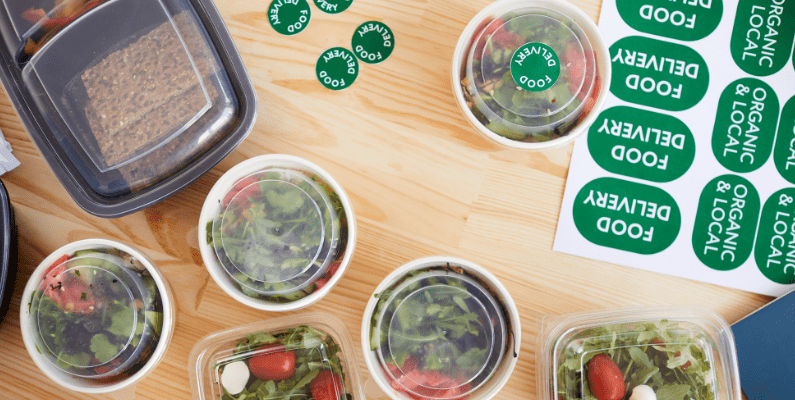
What platforms are best for selling food online?
The best platform helps customers find and buy your food quickly. However, not all platforms serve the same purpose. Some are better for local food delivery, while others cater to packaged goods or specialty food products.
The choice depends on your business model, the type of food you sell, and your long-term goals.
Owning a standalone ecommerce website is necessary if you want your business to be around for the long run. Let’s break down the best platforms to sell food online.
1. Your own ecommerce website
If you want to sell food directly to potential customers, create an ecommerce website.
You’ll have complete control over your business and branding and create a unique shopping experience for your target audience.
For example, if you want customers to order food conveniently, you can integrate an online ordering system into your site and make this possible. Add multiple shipping options like local pickup, deliveries, or customer preorders.
You can customize the look, feel, and functionality of your shop. This way, customers can easily remember your business brand, not a delivery app or marketplace.
Creating an ecommerce website cuts out the middleman
That means two things. You won’t pay commission fees to a third party, which eats into your profits. You also have complete ownership of all the data collected on your site. Using the customer data or info you collect can give you a competitive advantage over larger ecommerce stores.
70% of customers prefer to order directly from a restaurant website, so their money goes into your pocket.
However, you need to invest time in your store to make it a success. For example, you must ensure your brand storytelling is on point to stand out from your competitors.
Want to know the best setup to create your own food store (and start taking orders)?
The best setup: WooCommerce and the plugin Orderable
If you have a WordPress website, you can use the ecommerce platform plugin WooCommerce to add an ecommerce store to your website.
The core WooCommerce plugin lets you accept online payments, customize shipping options, and list food products. You’ll find extensions in categories ranging from inventory, shipping, and fulfillment to marketing, customer loyalty programs, and more to extend your store’s features.
Important note: WooCommerce works only with WordPress, which powers over 43.6% of all websites on the Internet. There are no marketplace restrictions or commission fees. Instead, it’s free to start. You only need a domain and hosting.
While WooCommerce adds ecommerce capabilities, the WordPress plugin, Orderable, lets you start taking food orders online.
Get Your Food Business Online With Orderable
Orderable is a user-friendly WordPress plugin that adds online ordering to your website.
Add your dishes, create your online ordering menu, customize your delivery schedule, and manage orders with ease.
Take food orders with Orderable
Installing Orderable to your ecommerce store adds a commission-free online ordering system directly to your newly-created WordPress site.
It works well for all types of food businesses that want to offer local deliveries, pickups, and prescheduled orders. These include cafes, home bakeries, restaurants, mom-and-pops, etc. Any company that wants to handle its delivery services instead of using a third party can benefit.
So what makes Orderable ideal for your online business? Here are a few reasons:

You can easily create mouthwatering online menus
Orderable provides product cards and ready-made menu layouts that make your food look irresistible. Customers can browse, select options, and place orders with just a few clicks.
You can add links to allergen and nutritional information for diet-conscious customers.
You’ll create a delivery schedule that works for you
With this plugin, you can set the days of the week you offer local deliveries or pickups. You can set business hours, control the number of orders they can accept within a specific timeframe, and even schedule orders for later.

Customers get the ordering experience they deserve
It has a mobile-friendly app-like design which makes it easy for customers to browse menus on their smartphones. They can check prices, read descriptions, customize menu items with add-ons, and leave a tip during checkout.
- Product labels like gluten-free allow customers to know exactly what’s in their food.
- You can notify customers when their order is on the way for delivery or ready for curbside pickup via SMS or WhatsApp.
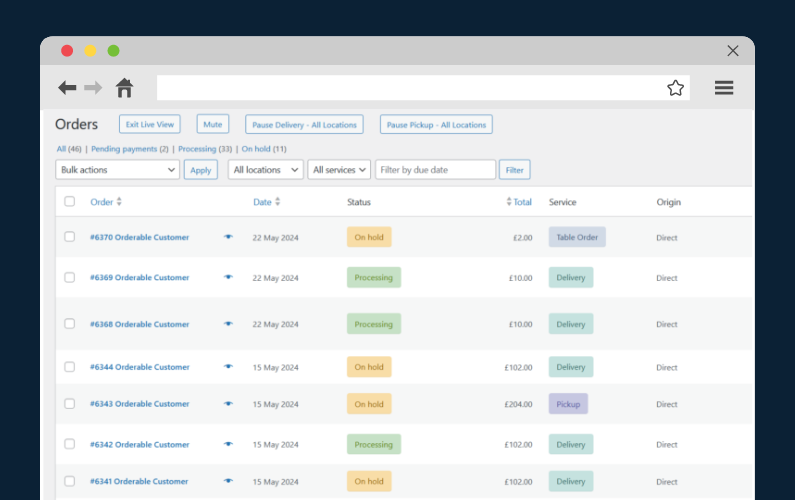
It has an effective order management system
The kitchen is immediately notified when a customer places an order so they can confirm receipt and update the customer. The staff can see accurate details of a customer’s order on a live order screen, including the name, address, date, type of service, total price, etc.
This information is essential for food preparation, packaging, and delivery logistics.
Again, you’re in charge of your website – no middlemen, no extra fees – just you and your customers.
How about selling on food delivery apps?
2. Selling on food delivery apps (Uber Eats, DoorDash, etc.)
Food delivery apps allow you to sell food products on their websites.
Instead of running your website, you list your menu items on an app. When someone places an order, the app handles the transaction and delivery. Some popular food delivery apps in the US include Uber Eats, DoorDash, and Deliveroo.
Most of these apps already have millions of hungry customers registered to their accounts. Because of this, they are ideal for any business that wants instant access to this vast customer base. Businesses that want to start selling products quickly and easily without setting up a store.
But there’s a catch.
You’ll part with high commission fees. Sometimes, you can get 15% to 30% off each sale, depending on the app you register your business with. This can make it harder for your new business to stay profitable with high commission fees (plus transaction fees charged by payment gateways).
Delivery apps own customer data. This can lead to lost opportunities for building repeat business or using data to drive advertising campaigns.
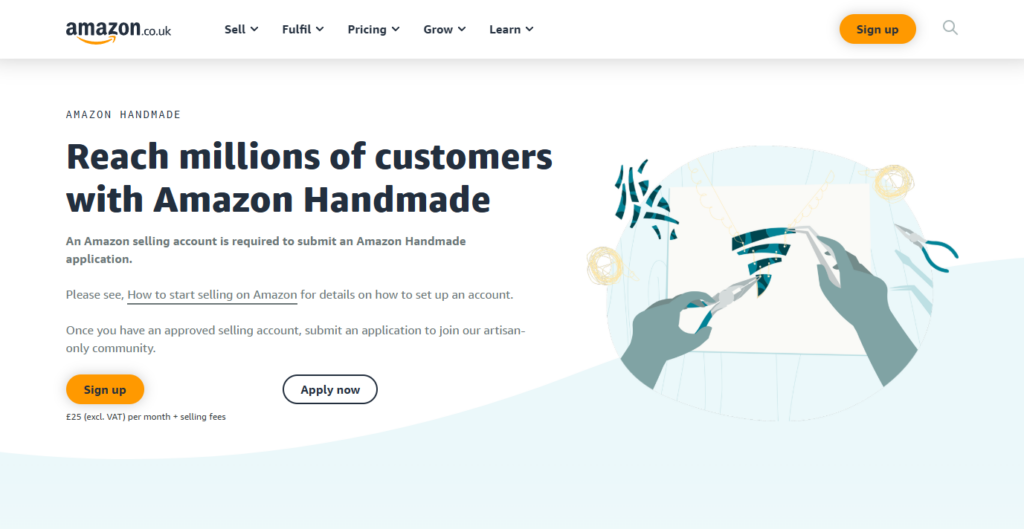
3. Selling on food marketplaces (Etsy, Goldbelly, Amazon Handmade, etc.)
A food marketplace is more or less similar to a delivery app. If you want to start selling food items but don’t want to set up an online store, you can register your food business to sell on a marketplace. You pay a fee to feature in the store. This can be a flat rate or a commission on each product you sell.
Commissions eat into profits. You don’t own customer data and have no direct relationship with your customers, so you won’t be able to control the customer experience fully.
The main difference is that a delivery app handles the entire ordering experience. Marketplaces provide a platform for buyers and sellers to connect. You’re responsible for packing and shipping orders to customers.
Generally, each marketplace has different rules. For example, Etsy is good if you sell homemade food, while Goldbelly focuses on gourmet products.
4. Selling via social media (Instagram, Facebook Shops, TikTok Shop)
Social commerce sells food directly on social media platforms like Instagram or TikTok Shop.
This option will work well if you already have a decent, engaged following that trusts your brand. You can showcase your food through posts, reels, or live videos and have customers buy instantly without leaving the app.
This method of selling is on the rise. 35% of Instagram users between 18 and 34 years old used the platform to make purchases in 2024.
However, you must work hard to create engaging content that stops the scroll and use social media SEO to stand out in the search results.
Instead of back-and-forth messaging to handle orders, you can link social media to your WooCommerce store for streamlined ordering.
That takes us back to why WooCommerce and Orderable are the best options for direct sales. Combining it with social commerce can make it easy to find new customers.
Let’s see how you can make all this possible.

How to sell food online
Selling on food delivery apps or marketplaces typically requires creating a seller account and listing your food products.
But if you want to learn how to sell food via an online store, this section will guide you through the process step by step.
The best approach is to create your WooCommerce-powered store with Orderable to handle local delivery, pickup, and online menu management. This way, you’ll have the flexibility to run your online food business your way. You don’t have to pay extra fees to other platforms.
Here’s how to get started.
1. Set up your online store with WooCommerce
Before setting up your store, pick a unique, memorable domain name and get reliable hosting like Nexcess.
A domain name is your website’s unique address where potential customers can find you online. For example, ‘orderable.com’. You’ll want to put some good thought into your domain name, as it represents your business.
Nexcess is a managed WordPress host that preinstalls WordPress for you, making setup much more manageable. Once that’s done, let’s find a template for your store.

Choose a lightweight template specifically for food stores
Go to your WordPress dashboard and navigate to Appearance > Themes to add a new theme.
A good theme should be lightweight, mobile-friendly, and easy to navigate. Avoid templates with unnecessary animations or complex layouts that can slow down your site.
Some great starter templates you can use from Kadence for a small food business include:
- Resto. It’s ideal for restaurants and cafés.
- Gourmet Burger. Works well for fast food or takeout businesses.
Once you install a theme, tweak the colors, edit the text, and modify the design to fit your brand. Let’s turn your WordPress website into a fully functional online store.
Install WooCommerce and configure basic settings
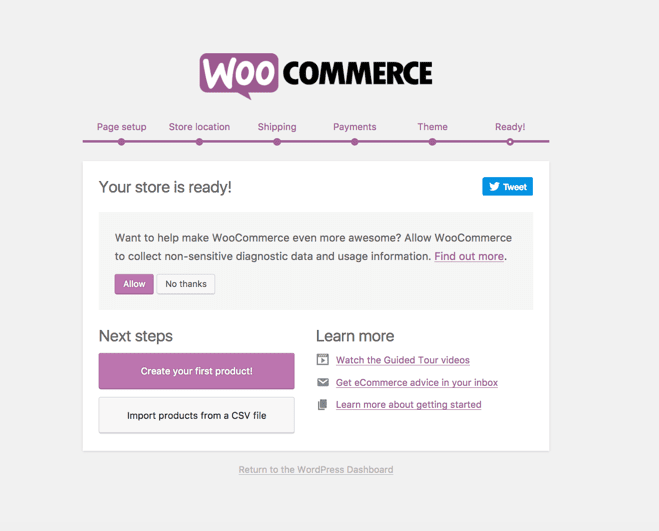
Since WordPress doesn’t have built-in ecommerce features, you’ll need to install WooCommerce. Search for WooCommerce in Plugins > Add New to install and activate it. Then, follow the setup wizard to configure your store’s currency, shipping, and tax settings.
Remember to create these essential store pages also:
- Shop page. It will display all your food products.
- Cart page. Shows items a customer has added before they check out.
- Checkout page. Where customers enter their payment and shipping details.
- My account page. Allows customers to view their orders and manage their details.
Note: WooCommerce typically creates these pages for you, so double-check before creating them yourself.

Add Orderable to enable online ordering
WooCommerce alone doesn’t have built-in features to handle food ordering efficiently. That’s where Orderable comes in. It adds a custom online ordering system to your WooCommerce store. This system allows customers to browse your food menu, select pickup or delivery times, and place orders on your website.
Go ahead and purchase Orderable from the official website, orderable.com, to install it.
Get Your Food Business Online With Orderable
Orderable is a user-friendly WordPress plugin that adds online ordering to your website.
Add your dishes, create your online ordering menu, customize your delivery schedule, and manage orders with ease.
Part of installing Orderable requires you to go through an onboarding process to set up your business.
You’ll enter your:
- Business information like name, address, postal code, and email.
- Choose which services you offer, either local delivery or pickup.
- Select which days of the week you’re open. Then, adjust your regular opening hours and save.
The onboarding process is optional, though. If you need to confirm some options quickly, you can adjust additional settings, such as updating your timezone, service hours, preorder days, etc., in Store settings.
A good website design makes it easy for customers to click the Order Now button. So, let’s build our menu next.

2. Build your online menu and product listings
You’ll need high-quality food images and detailed descriptions to build an online menu.
The reason is that high-quality images have been proven to increase food sales by up to 30%. So, ensure you capture high-quality food photography to show customers the kind of food they’ll be ordering.
WooCommerce makes adding these images as food products easy in your store. Go to Products > Add new product in your WordPress dashboard and:
- Enter the product’s name.
- Write a short description.
- Upload high-quality images.
- Set the prices and organize your food items into the right categories.
Note: If you purchased Orderable Pro, you’ll see additional tabs for nutritional info and allergens in the Product Data section.
Organize your food menu with Orderable
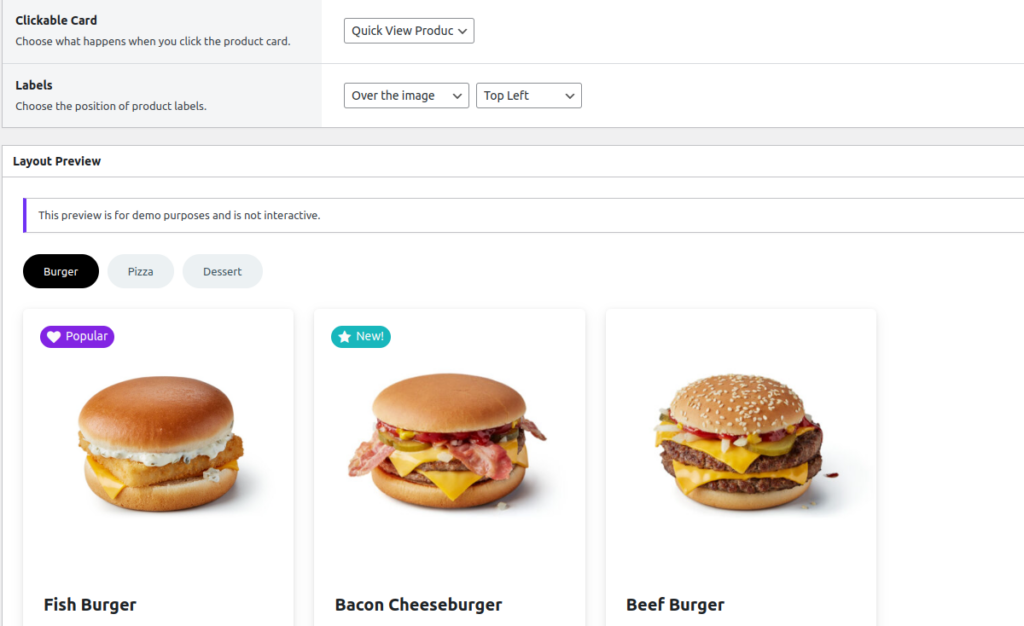
Orderable allows you to create product layouts where you can display the products you’ve added in a menu-style layout. In this way, it is easy for customers to pick and choose what they want to order.
Generally, Orderable uses product cards and menu layouts to display menu items.
- Product cards contain details such as images, descriptions, prices, and add-to-cart buttons.
- Menu layouts organize product cards neatly in a format that is easy to scan with the eyes.
For food items with different sizes, flavors, or portion variations, use WooCommerce Attribute Swatches to make the selection easier.
3. Set up secure payments and checkout
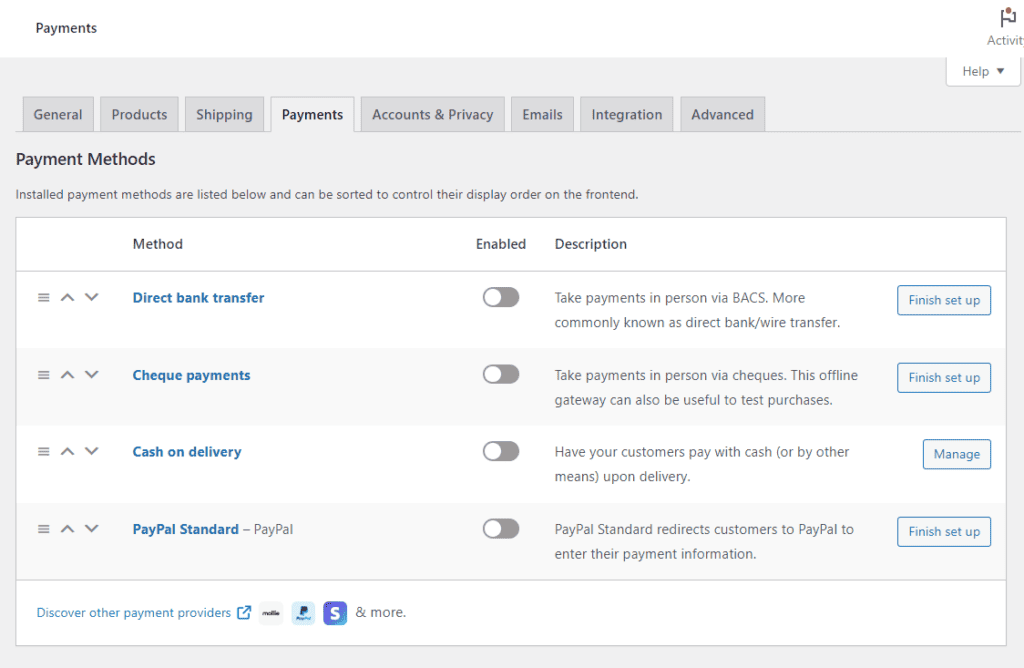
Customers also need a simple and secure way to pay when they proceed to checkout. Offering a variety of safe payment methods ensures they don’t abandon their carts just because their preferred option isn’t available.
Studies show that 13% of customers abandon checkout simply because there aren’t enough payment methods.
Some of the popular payment options customers trust and often use include:
- Credit and debit cards.
- Digital wallets like PayPal, Stripe, Apple Pay, Google Pay, etc.
Why upgrade the default WooCommerce checkout?
The default WooCommerce checkout is a single page with many form fields to fill. Customers often hesitate when they have to fill out lengthy forms.
The Baymard Institute found that 22% of shoppers abandon their carts because the checkout process is too long or complicated.
The solution is to break this page up with the help of the WooCommerce plugin, Flux Checkout.

Upgrade WooCommerce checkout with Flux Checkout
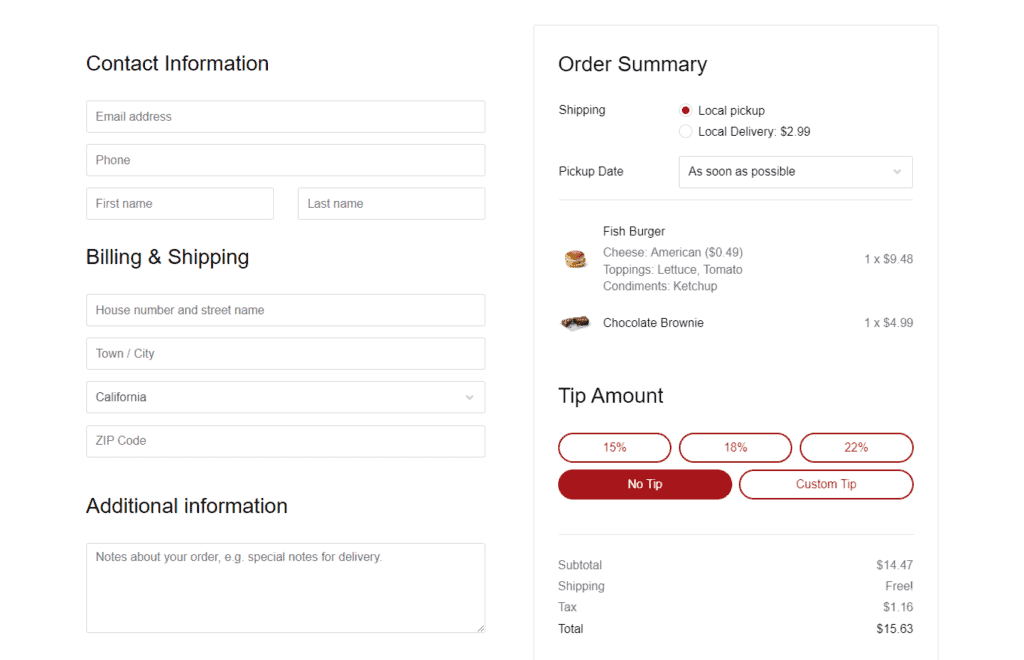
Flux Checkout is a WooCommerce plugin that replaces the default WooCommerce checkout with a multistep checkout page. The new page breaks down the key stages of the checkout process into a series of simple steps customers can easily follow and complete.
They can:
- Login or checkout as guests.
- Enter their billing and shipping information.
- Choose their delivery method and review their order.
- Choose a payment method and complete their order.
Customers will see their progress as they finish each step. It’s distraction-free. Combining that with its user-friendly checkout design makes customers more likely to convert than abandon checkout.
Tip: Use Checkout elements in Flux Checkout to create testimonials, FAQs, and trust badges to build trust with first-time customers.
4. Set up local delivery and shipping options
If you’re going to run a successful food business online, you’ll need a reliable fulfillment strategy, too. Without one, orders can be late, incorrect, or poorly packaged, leading to unhappy customers.
For your information, 38% of customers expect their food to arrive in less than 20-30 minutes while it’s hot.
The following are different ways Orderable enables business owners to streamline their fulfillment strategy.
For customers who are close by, you can allow them to pick up their orders. You can also offer local deliveries for customers who prefer this option because of distance.

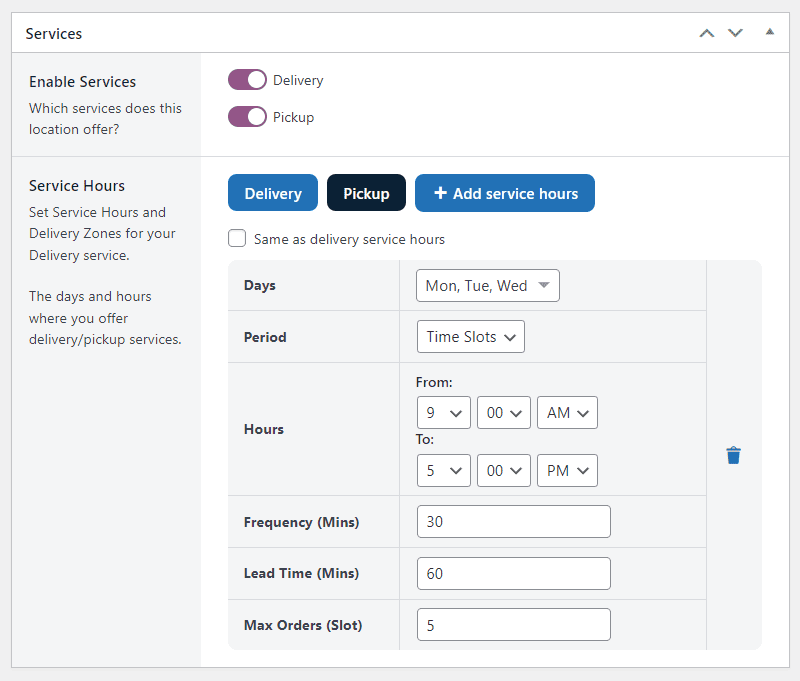
Create flexible schedules and maximize delivery slots
Orderable gives you control over your delivery service. Choosing the days of the week you’ll deliver food is one of them. More specifically, you add specific time slots when customers can place orders for delivery or pickup (e.g., 9-11 AM, 12-2 PM, 3-5 PM).
Then, limit the number of orders you can fulfill for each time slot so you (and your staff) aren’t overwhelmed during busy hours. You can add these time slots as a date picker during checkout.
Other options you can offer during checkout include:
- ASAP deliveries.
- Same-day deliveries.
- Prescheduled orders for customers who order after business hours.
- Next-day deliveries.
Live order screen for accurate order management
Not to mention, this plugin accurately captures all order details on a live order screen. Details like a customer’s name, address, and special requests. Such information can help you with food preparation and packaging so your team delivers on time.

Create delivery zones to cover more areas
You can also expand your territory by creating delivery zones to cover more areas. This Orderable feature allows you to add more geographical locations to deliver food and reach more customers comfortably.
Essentially, the larger the geographical area you serve, the more opportunities you have to make sales.
Send order notifications
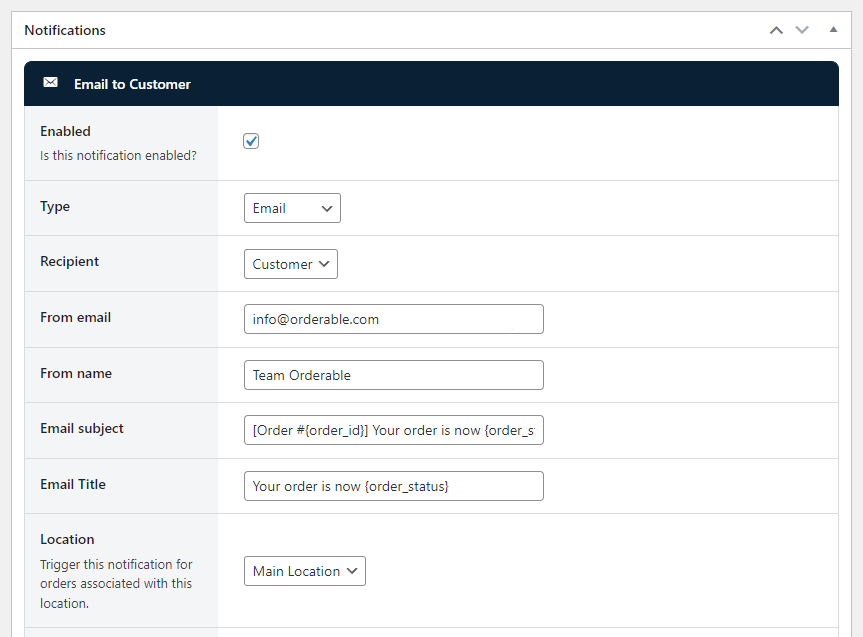
With Orderable, you can let customers know you’ve received their order by email, SMS, or WhatsApp. You can create custom order statuses to update customers on their order progress.
For example, you can let them know when the order is on the way or is being prepared.
5. Packaging, labeling, and food safety
When a customer orders food online, the first thing they see when it arrives is the packaging. If it looks clean, is well-designed, and matches your brand, it leaves a strong impression on customers. It tells them that you’re serious about quality.
Labeling also matters. People remember you if your logo, colors, and brand name are on the package. If they love the food, they’ll know exactly where to order next time.
Consider using eco-friendly materials and packaging. That’s because 72% of customers globally are actively purchasing more eco-friendly products.
Check for labeling requirements in your region
Also, you can’t just put anything on your labels and call it a day. Different countries have rules about what food businesses must include. In the U.S., the FDA requires ingredient lists, allergens, and expiration dates. The UK has the FSA, and the EU has its strict laws. If you don’t follow these rules, you could face fines or even be banned from selling.
But more importantly, clear labels help customers trust your brand and feel safe ordering from you again.
6. Market your food business online
Finally, launch and start marketing your food business online.
Marketing allows you to attract new customers to your store. It makes them aware of your food business and gives them a reason to order.
Some tips to get you started
You can set up Google Analytics and Google Search Console so you can track visitors and see what search terms you’re ranking for. For example, search terms like “best cakes near me” can help optimize your product pages for search.
You also want to list your business on Google Business Profile so local customers can easily find your menu, location, and contact details.
We’ve covered most of these techniques in our SEO for restaurants guide. Check it out.
Use social media and email to market too
You can also:
- Start social media marketing on platforms like Instagram, TikTok, or Facebook. Post food photos, reels, and customer testimonials.
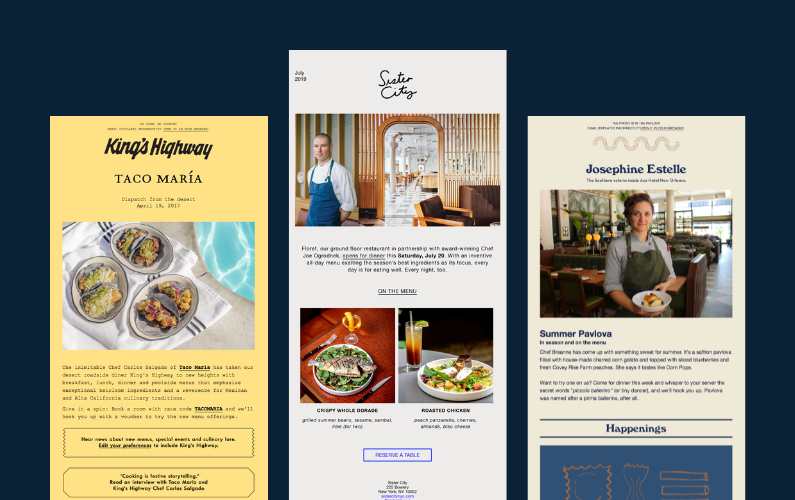
- Grow your email list to boost repeat orders with email marketing. A simple email with a promo code or a reminder about a favorite dish can bring someone back for another order.
- Start a loyalty program as well. It’s easier to sell to existing customers than to new ones.
Most importantly, consider your site’s performance as slow pages or a poor mobile site can frustrate customers.
Learn how to sell food online today
Selling food online involves three key things: the right platform, proper licensing, and innovative marketing.
You can sell on food delivery apps and marketplaces, but they charge high commission fees and withhold customer data. That makes WooCommerce and Orderable the best local delivery and online food sales setup. You get complete control over your business, direct customer relationships, and no third-party fees eating into your profits.
WooCommerce lets you set up an online store. Orderable allows you to start taking orders directly from your WooCommerce store and determine your schedule.
Sell food online today with WooCommerce and Orderable for the best online ordering experience.
Get Your Food Business Online With Orderable
Orderable is a user-friendly WordPress plugin that adds online ordering to your website.
Add your dishes, create your online ordering menu, customize your delivery schedule, and manage orders with ease.
Gina Lucia is our in-house Content Manager at Orderable. She writes articles, user guides, technical documentation, and creates videos on everything WooCommerce and Orderable.
Gina has been working in the WordPress/WooCommerce space since 2012 when she developed WordPress websites for clients large and small.
For the past 8 years, she’s been writing about everything WordPress and WooCommerce, becoming an expert in what makes a WooCommerce store succeed.
When not writing, Gina loves to tend to her vegetable garden, read, or travel to mainland Europe.
Don’t miss out on the latest Orderable news!
Sign up for our newsletter to receive the latest news from the blog, you’ll get pinged every week with a digest of the latest updates.
[fluentform id=”6″]

Related Articles

How to Find and Talk to Restaurant Influencers in 2026
5 Online Restaurant Management Tips for 2026
How to Start an Online Bakery in 2026
Get Your Restaurant Online With Orderable
The WooCommerce plugin designed to help restaurants take orders online – with no added fees!
View Pricing

