

How to Set up a Restaurant Table Management System

How to Set up a Restaurant Table Management System


Gina Lucia


Looking to set up and use a restaurant table management system to streamline your table service? This guide is here to help.
👋 In this article, we’ll walk you through what a restaurant table management system is, touch on its advantages, and suggest the top systems to use.
We’ll cover the following:
- What is a restaurant table management system.
- What does a good restaurant table management system include (and the benefits).
- The top 2 restaurant table management systems.

We’ll also introduce you to another alternative if investing in a full table management system isn’t feasible for your restaurant.
Let’s begin by breaking down what exactly a restaurant table management system is.
Get Your Restaurant Business Online With Orderable
Orderable is a user-friendly WordPress plugin that adds online ordering to your restaurant website.
Add your dishes, create your online ordering menu, customize your delivery schedule, and manage orders with ease.


What is a restaurant table management system?
A restaurant table management system is a digital platform that organizes your table layout, helps you handle reservations and walk-ins, and optimizes seating arrangements.
In simpler terms, it allows your restaurant staff to easily see which tables are available, booked, or occupied within the dining room. This makes it easier to seat guests efficiently. At the same time, they can manage reserved tables, handle waitlists, and monitor table turnover.
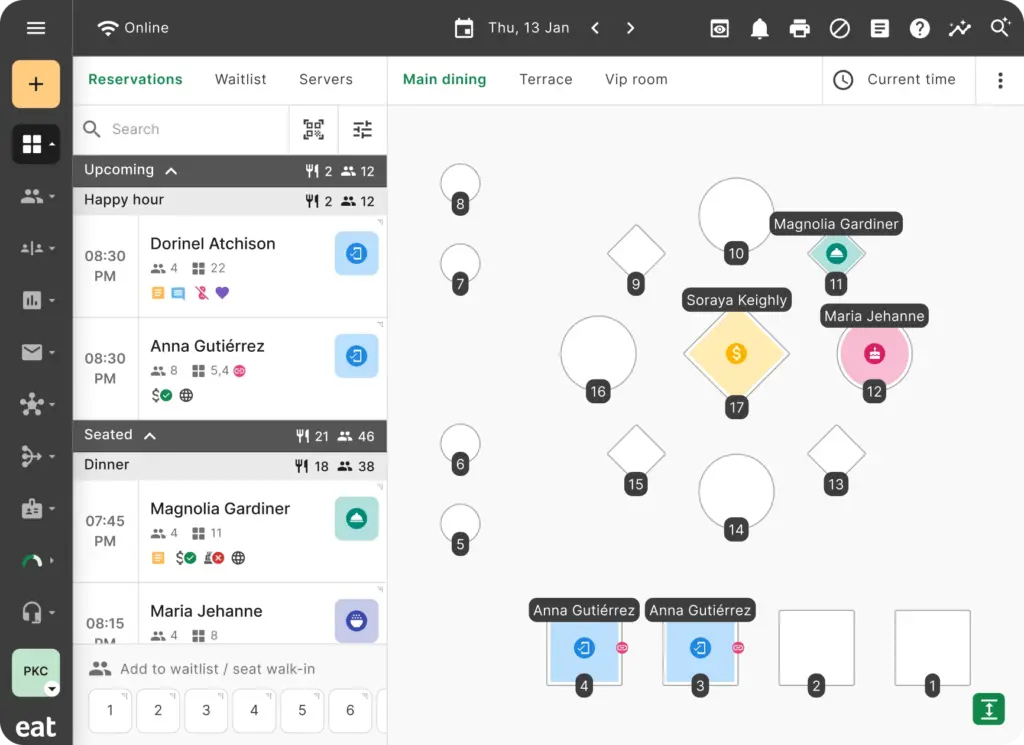
Your staff can access this information from any device with an internet connection, such as an iPad, tablet, or smartphone, as long as they’re logged in.
Overall, the goal is to ensure a smooth customer dining experience and streamline front-of-house restaurant operations.
Now, let’s dig further into the main features that make this possible for a restaurant table management system.

What does a restaurant table management system usually include?
A restaurant table management system usually includes five main components that collectively handle specific aspects of efficient table management. These include:
1. Reservation management
Restaurant reservation management organizes and tracks customer reservations.
Broadly, it involves handling guest bookings, noting reservation details, updating seating plans, and adjusting for cancellations, no-shows, or other unforeseen changes. It’s also important to coordinate all this (and more) with your staff to see through the success of a reservation.

Key features of reservation systems
Several features in a reservation system effectively automate these operations, helping to reduce reservation mistakes like no-shows.
📈 For instance, in the U.S., the restaurant industry estimates that 20% of reservations end up being no-shows.
Some of the commonly used features include:
- Online booking. This lets diners make online reservations directly through your website or third-party restaurant reservation marketplaces like OpenTable, Resy, etc. Some reservation systems link up with online channels like Google, Facebook, and Instagram that allow online reservations.
📈 Toast found that 65% of diners surveyed go directly to a restaurant’s website and use whatever reservation option they have available.
- Automated notification. After guests book tables, this feature lets you notify them with automatic confirmation messages via email or SMS. If you want to reduce no-shows, send reservation reminders.
- Reservation tracking. This allows you to keep track of all reservation details, including date, time, party size, and other customer information (or preferences).
Other include handling table reservations, maintaining guest information, and more. Next up is waitlist management.
2. Waitlist management
Another way to optimize your restaurant reservation management system is to use waitlists.
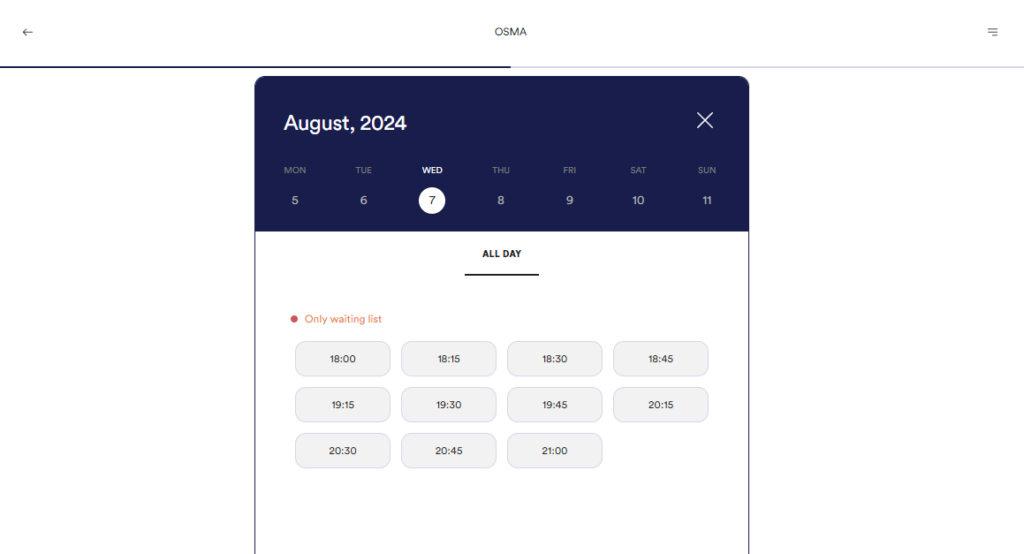
Waitlist management keeps track of waiting customers and notifies them when their table is ready. Most table management systems blend their reservation system with waitlist coordination features. In this way, diners who couldn’t make a reservation on time can join a waiting list.
Why waitlist management is important
📈 One of the factors that can influence nearly 50% of customers to wait longer for a table is joining a waiting list. Or, receiving a notification when their table is available.
In other words, waitlist management enables you to reduce walkways during the busiest hours. Specifically when there are no tables available in the dining lounge.
Online waitlists are usually created for walk-in customers to join. They can see where they’re on the list and know how long they will wait. The main objective of a waitlist is to help manage guest wait times and reduce congestion at the door.
When a guest’s table is ready, you can ping them with a custom SMS notification. Real-time updates are handy for diners who want to monitor their place in the queue and improve their guest experience.
Moreover, the tool should allow your staff to monitor the current status of customers on the waitlist and their estimated wait times.
Now, let’s move on to our tables.

3. Table allocation and seating
This feature streamlines table management by providing a visual representation of the table layout, seating arrangements, and real-time table status updates. It simplifies the process of assigning tables and seat walk-ins, reservations, and other guests.
By visualizing the floor plan, staff can optimize table assignments considering party size, seating preferences, and availability. Some systems even allow for creating a digital restaurant floor plan. While staff typically updates table statuses as occupied, available, reserved, or needing cleaning, the system offers real-time updates for efficient seating arrangements.
Advanced systems can suggest available tables for incoming guests and assist with adjustments for larger groups or special events.
Generally, real-time tracking of table statuses enables you to:
- Make quick and accurate decisions regarding guest seating.
- Provide accurate estimations of wait times.
- Communicate updates on the number of tables ahead to guests.
Ultimately, this feature ensures that guests have realistic expectations about being seated.

4. Customer relationship management (CRM)
One of the ways a restaurant table management system enhances the guest experience is through personalization. This can be easily achieved using customer relationship management (CRM) within the system.
It lets you create detailed guest profiles that store customers’ dining preferences, allergies, and special requests. This information can be used to provide personalized service.
This way, your restaurant can manage guest expectations with accurate information. Additionally, CRM tracks guests’ reservation histories, helping identify regular customers and customizing services to their preferences.
For instance, recording guest seating preferences can be applied to future reservations for enhanced personalization.
Overall, integrating this with loyalty programs, personalized rewards, etc., can foster customer loyalty and encourage repeat business. Customer profiles also assist in communicating with guests through customer relationship management programs.
📈 41% of customers say that loyalty programs encourage them to buy from restaurants.
5. Reporting and analytics
Reporting and analytics provide valuable insights into your restaurant’s performance, trends, and customer behavior.
It allows you to generate and analyze reports on reservation trends, no-shows, booking sources, busiest periods, guest data, repeat customers, and more. By analyzing this data, you can make data-driven decisions to improve operational efficiency and increase revenue.

Key metrics to monitor include table turnover rates, peak dining times, seating capacity, and reservation trends. Understanding these factors helps you maximize table usage, minimize wait times, and determine staffing requirements. Additionally, understanding customer preferences and behavior enables you to customize marketing campaigns, refine menu offerings, and improve overall guest experiences.
Generally, monitoring these insights enhances service efficiency by optimizing table usage, reducing wait times, and identifying seating trends.
Note: Some software includes all of the above, while others may have only some features. Regardless, every component plays an important role in managing your restaurant tables.
Now that we know the five main features of a table management system, is it worthwhile getting one?

Do you need a table management system?
While a table management system makes it easy to seat and serve guests effectively, there are things to consider when choosing one. Does their business model align with yours?
- Ask yourself questions about the size and location of your business. How large is your restaurant? How many tables do you have? Do you manage multiple dining areas or outdoor seating?
- How about the volume of reservations versus walk-ins? What is your typical customer flow? Do you handle numerous reservations daily? Or do you frequently host large parties or special events that require careful table allocation?
- Reflect on your customer experience. Are your guests facing long wait times or inconsistent service? Do you sometimes deal with double bookings or lost reservations? Does it include features to help you streamline restaurant operations and guest experience?
- Look at your operational efficiency. How well does your current system manage peak times? Are your staff struggling with table assignments and turnover?
Investing in a table management system could be a great decision if your restaurant requires a boost in any of these areas. However, if a full software investment isn’t feasible, we have an alternative solution that can still provide significant control over your tables.
But first, let’s scratch the surface with some benefits of using restaurant table management software.

What are the benefits of using restaurant table management software?
Using table management software in your restaurant has several benefits for you and your customers. Let’s look at them independently in this section.
Benefits for restaurant owners
The following are some of the benefits of using a restaurant table management software for you as the restaurant owner:
- It streamlines restaurant operations. This system automates the management of reservations, waitlists, table assignments, and dining room layouts. Consequently, this will streamline your front-of-house operations, reduce the workload on your staff, and increase your operational efficiency.
- Ability to make data-driven insights. A good system generates reports. Monitoring valuable analytics like customer preferences, peak dining times, and table turnover can help you make informed decisions about streamlining your operations.
- It increases your revenue and profitability. For instance, increasing your table turnover rates implies that you’re serving more customers at a time. Optimizing seating capacity in this way can boost restaurant revenue and maximize your profitability.
- Easily integrates with other restaurant technologies. For example, it integrates with existing POS systems, inventory management software, etc., and manages them in one place.

Benefits for your customers
Your customers will also get to enjoy the following benefits from your restaurant table management software:
- Personalized experiences. By storing customer information and preferences, you can offer personalized customer service to customers and improve their customer satisfaction and loyalty. Increasing your customer loyalty by just 5% can result in a 25-95% increase in profitability.
- A better overall customer experience. Reducing wait times ensures smoother dining experiences with accurate seating arrangements and personalized, timely service.
At this point, if you’re thinking investing in full table management might be a little much, we have an alternative solution to help.

An alternative to a table management system
Restaurants invest in a full table management system to handle reservations, manage waitlists, collect detailed guest profile information, and more at their tables.
But if this isn’t your intention (or on your to-do list), investing in a full table system might be excessive and unnecessary. Instead, you should opt for a cost-effective alternative tool like Orderable and save cash.
This plugin is a great alternative for restaurant businesses that want a little control over managing their tables without investing in full table management software.
So, what is the WordPress plugin Orderable?
What is Orderable?
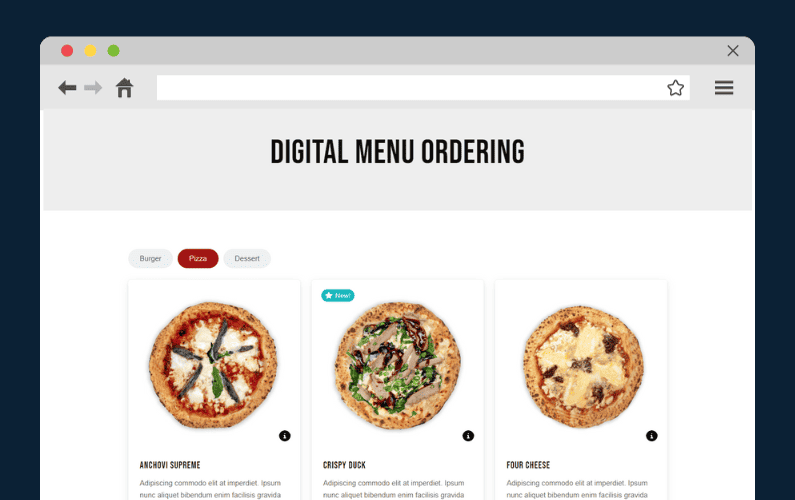
Orderable is a WordPress plugin that adds a robust online ordering system directly to your restaurant website.
Besides facilitating online orders, it includes additional features to let restaurants manage customer experience around their tables. Ensure in-house table orders are taken accurately and relayed to the kitchen promptly. Connect their digital menu to tables by assigning unique QR codes and more.
Managing your tables with Orderable will give your customers the new dine-in experience they deserve.

How Orderable helps you with table management
The following are Orderable features that can help manage your tables, speed up table service in-house, and create more happy customers.
A simple, efficient QR code table ordering system
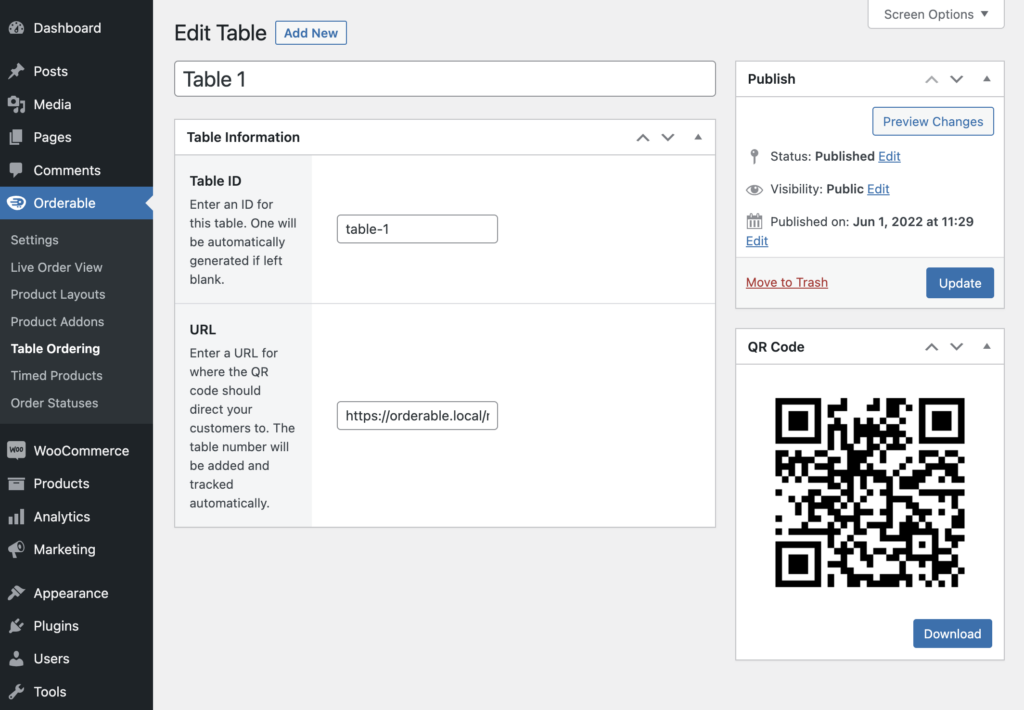
This feature connects your online menu to unique QR codes printed and placed on all tables. It lets customers place orders directly from their tables by scanning QR codes using their smartphones or iPads. All orders are accurately assigned to each table.
Create an online menu that customers can order from
This menu also contains allergens, dietary, and nutritional information so customers can receive the right food. You can provide extra information on these types of food in your menu or simply label these foods using Orderable’s product labels. This way, customers with special dietary requirements can find them at a glance.

See table orders as they come in on a live order view screen
The screen displays accurate table orders in real-time, including customer preferences on how they’d like their food order prepared. It also helps your staff serve the right dish at the right table, coordinate with the kitchen, and ensure timely service.
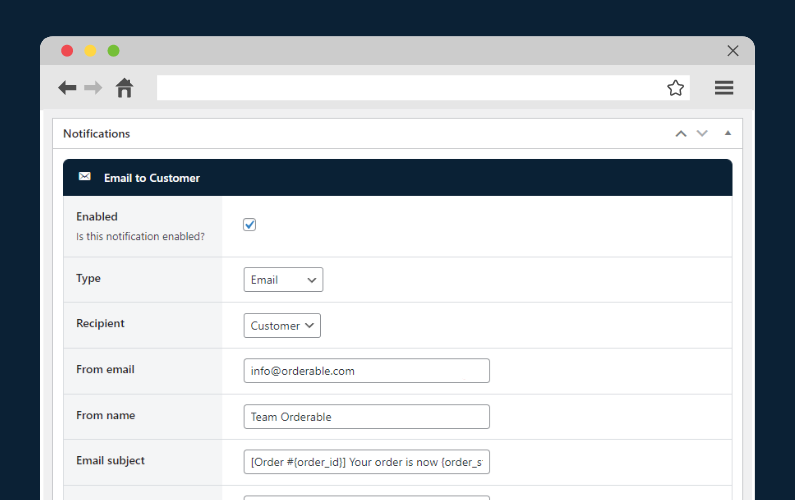
Timely order notifications
As soon as a customer places an order, the kitchen will receive a notification. The kitchen can also inform the diner of the same to give them peace of mind their food is being prepped.
The best part is you’ll inform customers on the status of their orders on their preferred platforms such as SMS and WhatsApp.
Payment processing
This lets customers pay their bills quickly and securely using mobile payments. It speeds up the payment process and frees up tables faster for customers.
If you want more control over your tables like handling reservations and waitlist, we’ve handpicked the top 2 restaurant table management systems to help.
Get Your Restaurant Online With Orderable
The WooCommerce plugin designed to help restaurants take orders online – with no added fees!

Top 2 restaurant table management systems
The following are the top 2 table management systems we’ve carefully hand-selected for you.
They include all five major components of effective table management:
- Eat App
- SevenRooms.

Eat App
Eat App is a cloud-based restaurant table management solution that enables restaurant managers to accept online reservations and optimize seating arrangements. It also manages all aspects of front-of-house operations and the guestbook.
It simplifies the process for businesses to track their regular customers, monitor their spending habits, and record any special requests and notes they may have. This makes it much easier for businesses to provide personalized service to their regular customers.
Its main features include:
- Reservation and waitlist management.
- Table management and customizable floor plan.
- Restaurant automation.
- Customizable email confirmation.
- Advanced capacity management.
- CRM & guest database.
The highest pro pricing plan starts at $160/month, giving your team full control and flexibility to enhance the guest experience. The free plan allows you to get started with basic table management.
Besides, it’s commission-free. This is a big plus, considering that many reservation systems have a cover charge for every person making a reservation.

SevenRooms
SevenRooms is an all-in-one, commission-free reservation system and guest CRM that puts you in control of the guest experience.
It prioritizes customer experiences and integrates data to improve customer acquisitions and retention. This software can also be integrated to manage other hospitality ventures, such as virtual events and entertainment venues.
They offer a full suite of integrated solutions including:
- POS integration.
- Reservation management.
- Table and restaurant floor management.
- Waitlist management.
- Guest data collection.
- Business reporting analytics and performance reports.
SevenRooms has three different pricing plans and multiple add-ons they tailor based on your restaurant’s needs. Just book a call with their sales team to get specific pricing information. Like the Eat App, it doesn’t charge cover fees for reservations.

Get to grips with restaurant table management today
Setting up a restaurant table management system streamlines the operations around your tables to enhance your table service.
It lets you handle reservations, plan seating efficiently, manage waitlists, and send follow-ups. You can also use features like guest tagging and automated marketing to provide guests with unique, personalized experiences.
However, if investing in full table management software isn’t exactly your intention, alternative tools like Orderable can help.
Orderable is primarily an online ordering system. This plugin allows you to provide QR code table ordering, collect special requests/instructions from diners, and boost sales in the process with order bumps, tip prompts, etc.
While it isn’t a table management system, it provides additional features that give you control over customer experiences around your tables.
Get Your Restaurant Business Online With Orderable
Orderable is a user-friendly WordPress plugin that adds online ordering to your restaurant website.
Add your dishes, create your online ordering menu, customize your delivery schedule, and manage orders with ease.
Gina Lucia is our in-house Content Manager at Orderable. She writes articles, user guides, technical documentation, and creates videos on everything WooCommerce and Orderable.
Gina has been working in the WordPress/WooCommerce space since 2012 when she developed WordPress websites for clients large and small.
For the past 8 years, she’s been writing about everything WordPress and WooCommerce, becoming an expert in what makes a WooCommerce store succeed.
When not writing, Gina loves to tend to her vegetable garden, read, or travel to mainland Europe.
Don’t miss out on the latest Orderable news!
Sign up for our newsletter to receive the latest news from the blog, you’ll get pinged every week with a digest of the latest updates.
[fluentform id=”6″]

Related Articles
Restaurant Automation: 10 Techniques to Try in 2026

Restaurant Food Photography Tips for More Sales
SEO for Restaurants: How to Improve in 2026
Get Your Restaurant Online With Orderable
The WooCommerce plugin designed to help restaurants take orders online – with no added fees!
View Pricing

