

Advantages of Using an Online Food Ordering System

Advantages of Using an Online Food Ordering System


Gina Lucia


If you want to learn about the advantages of an online food ordering system for your business, this article is here to help.
Implementing an online food ordering system offers multiple benefits conventional methods like in-person ordering or phone orders can’t match.
We’ll discuss the benefits and some cons of an online ordering platform throughout this article by looking at:
- What is the purpose of an online food ordering system?
- The advantages of using an online food ordering system (the pros and cons as well).
👋 We’ll also introduce you to a great online ordering solution you can easily set up and enjoy the full benefits of having an online ordering system.
Let’s begin with the purpose of an online ordering platform.
Get Your Restaurant Business Online With Orderable
Orderable is a user-friendly WordPress plugin that adds online ordering to your restaurant website.
Add your dishes, create your online ordering menu, customize your delivery schedule, and manage orders with ease.


What is the purpose of an online food ordering system?
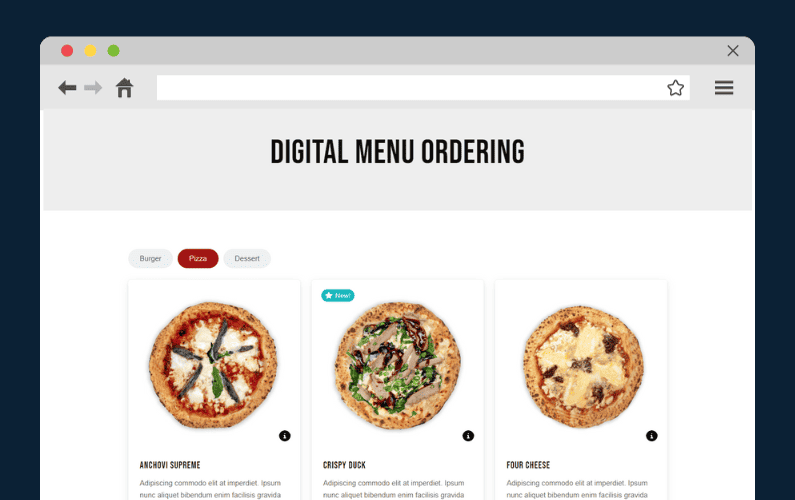
The whole purpose of an online food ordering system is to make it easier and more convenient for customers to place orders through your website or mobile app.
It simplifies the ordering process for customers, allowing them to:
- Browse your online menu.
- Select a dish, customize their order, and place a special request or instruction for the kitchen on preparing their food.
- Then, make payment online without needing to call the restaurant.
This journey ends when the food is delivered to a customer’s address or location. Or they drop by your restaurant to pick up their food.
But why might a food business use this system?
As a restaurant business, you would use this online system to streamline food ordering processes and other operations within your establishment.
Most importantly, online ordering systems offer additional advantages that conventional methods like in-person ordering or phone calls don’t provide.
For instance, online food ordering is open around the clock, meaning customers can place orders at any time. It also reduces order mistakes, mixups, and misunderstandings. It lets you reach more customers by providing a convenient way for them to access your services.
All these are reasons enough to convince you to use ordering software. This system also helps restaurants manage their workflow better by automating orders and tracking customer preferences. This can improve your overall efficiency, enhance customer satisfaction, and increase revenue at the same time.
It is much harder to achieve such convenience, speed, and accuracy with conventional methods. That being said, let’s dive deeper into the benefits of online ordering systems.

What are the advantages of an online food ordering system?
There are multiple advantages your restaurant or any other food business will reap if they implement an online food ordering system.
So, if you’re still on the fence about this ordering software, the following are some benefits that you might be missing out on.
What are the pros and cons of an online food ordering system?
We’ll take an all-rounded approach by examining both the pros and cons. Let’s start with the pros.
Pros:
1. Increased convenience for customers
Online food ordering systems allow customers to place orders anytime and anywhere. They don’t need to call or visit your restaurant to order.
This 24/7 accessibility means that they can order at their own convenience – whether they’re at home or in their workplaces. The 24/7 availability also means customers can pre-order outside your business hours (if you want to). When you open, you’ll already have a list of orders to start working on and fulfill orders.
Online food ordering is literally at the customer’s fingertips. They can easily browse your menu, customize their orders, and complete their purchases on smartphones, tablets, computers, etc.
📈 Mobile ordering represents 60% of all digital restaurant orders today. More than half of restaurant customers prefer to order from their mobile devices.
This convenience often leads to higher customer satisfaction. It can also encourage repeat business as customers appreciate the ease, speed, and efficiency of the process.

2. Expanded customer reach
📈 More than 70% of customers prefer to order food online for deliveries and takeout.
Implementing an online food ordering system allows you to target a new customer base who prefer to order directly from you.
It also makes it easier to reach new customers who may not live nearby and are searching for delivery options from the comfort of their homes. One way to do this is opening a new restaurant business location so you’re as close to these new customers as possible and save on delivery fees.
💡 Boost your online presence with our guide on local SEO for restaurants to reach the right customers.
By catering to both local customers and those further away, restaurants can significantly expand their potential customer base and increase sales.
3. Improved order accuracy
One of the key advantages of an online food ordering system is its ability to improve order accuracy.
When customers place orders online, they can review the menu, select specific items, customize their meals, and include special instructions directly through your ordering app. This reduces the risk of miscommunication often associated with phone calls or in-person orders, where details might be missed or misunderstood.
This ordering system is also automated to ensure that every order is clearly recorded. Customers can verify the accuracy of their order details before they can checkout. The kitchen can see the exact order details on a live order screen, so they don’t miss a thing.
This further reduces errors such as incorrect menu items, missing modifications, or wrong quantities. The result is fewer customer complaints and wasted food. Ultimately, this enhanced accuracy not only saves time. It also leads to higher customer loyalty as customers trust they will receive exactly what they ordered.

4. It increases restaurant operational efficiency
Automating the order-taking processes allows you to focus on other parts of your restaurant operations, like food preparation, packaging, and delivery. It also enables you to provide excellent customer service to your online audience so they remember you after their food is delivered.
For instance, the kitchen usually receives detailed order information, including special requests or instructions. This info can help your staff prepare meals exactly to the customer’s preferences, such as adding extra toppings or condiments.
At the same time, the delivery personnel can use the customer’s address or location details to plan the delivery route earlier. This will ensure the food arrives hot and fresh.
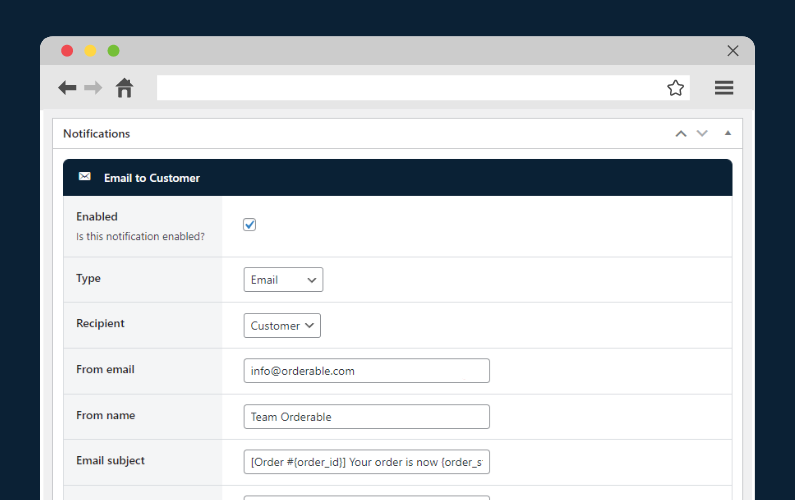
Updating customers of their order progress through SMS notifications doesn’t only give them peace of mind. This gesture (plus other unique customer services) can keep them coming back again and again.
Customers can take their time deciding without the hassle of tying up staff. For instance, switching from phone calls to online orders eliminates the hassle of handling indecisive callers and saves staff time.
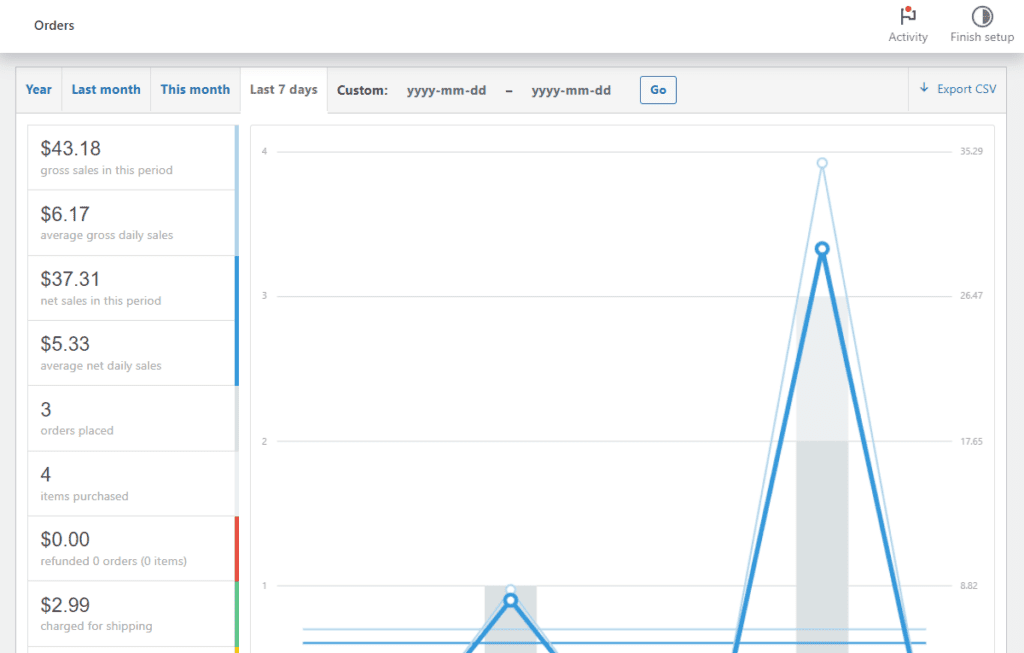
5. Accurate customer data collection and analytics
The following are some examples of customer data online food ordering systems usually collect:
- Order history. Like details of past orders, specific food items, and customizations.
- Customer preferences. Such as their favorite dishes, dietary restrictions, frequently ordered items, etc.
- Contact information. Like email addresses, phone numbers, and delivery addresses.
- Preferred payment information. Like credit card and other digital wallets
- Reward or loyalty program participation. Data on customers enrolled in loyalty programs, including points earned and redeemed.
- Location data for delivery or pickup.
- Order frequency
- Peak ordering times, etc

The benefits of collecting customer data and analytics
Collecting these customer data points can help owners or restaurant management in several ways:
- Restaurants can implement targeted marketing campaigns, such as personalized promotions or special offers for specific customers.
- It improves menu planning and pricing. Understanding popular dishes and dietary preferences will allow you to adjust your menu accordingly. You can highlight best-selling menu items, introduce more of what customers prefer, and even remove less popular dishes.
- Payment and location data can help you optimize your delivery routes, delivery times, and the overall delivery system.
- Loyalty programs tied to order frequency encourage customers to order more often.
- And more.
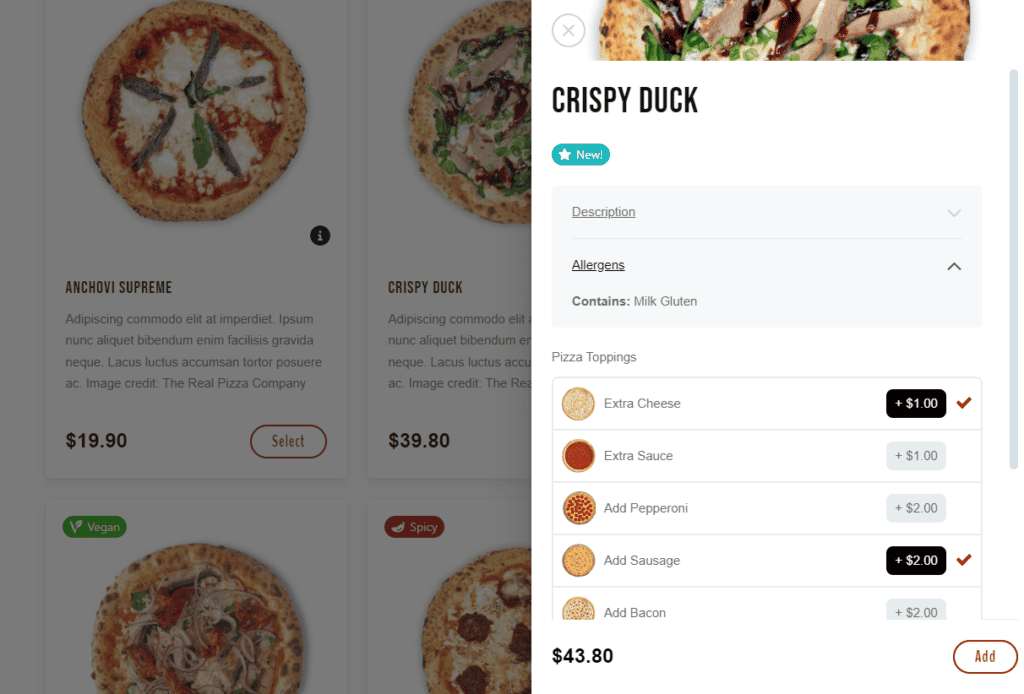
6. More upselling opportunities
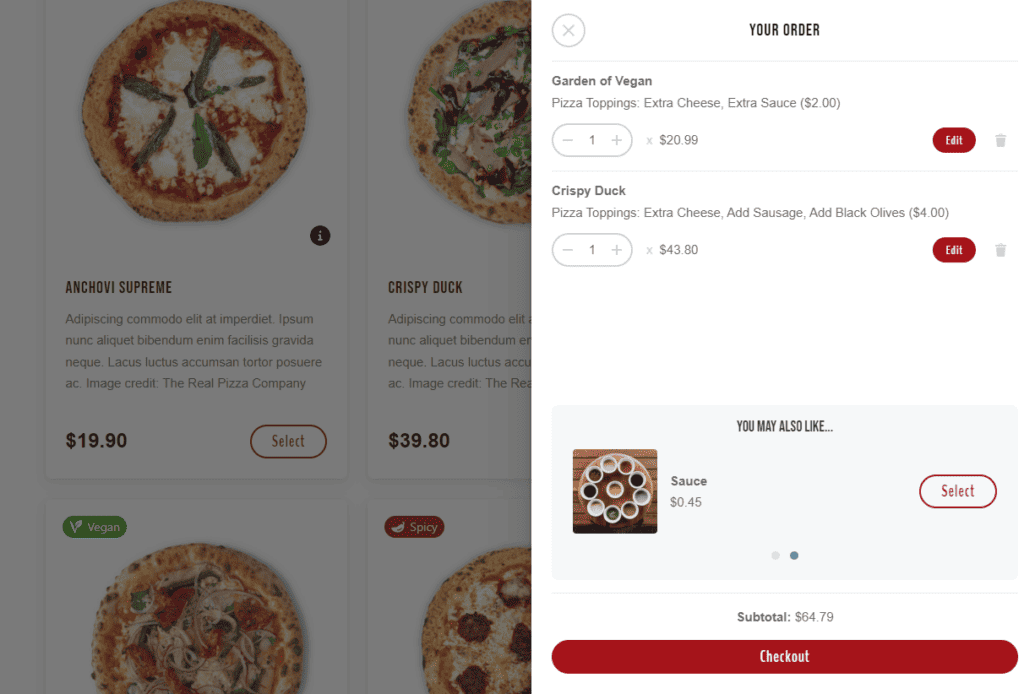
Most online food ordering systems suggest complementary items such as sides, drinks, or desserts based on what the customer has selected.
For example, if a customer orders a pizza, the system might recommend additional toppings like premium cheese, pepperoni, or fresh veggies for an extra cost. This automated upselling strategy can encourage customers to add more food items to their carts.
Consequently, this will increase a customer’s average spending on an order. If done correctly, upselling dishes in this manner can increase your revenue.
Suggesting complimentary items also makes it easier for customers to discover new items they might enjoy with their dishes. In the long run, these small additions can positively impact a restaurant’s bottom line, increase profits, and improve customer satisfaction.

7. Enhanced customer experience
Features like order tracking, multiple payment options, personalized recommendations, etc., in an ordering system, are designed to improve the overall customer experience.
- Order-tracking. Real-time order tracking allows customers to monitor the status of their order from preparation to delivery. They’ll have peace of mind if they know exactly when their food will arrive. Plus, this transparency builds trust and keeps customers informed every step of the way.
- Multiple payment options. Offering a range of payment options, such as credit cards, digital wallets, and cash on delivery, gives customers flexibility and convenience.
📈 Research by the Baymard Institute reveals that 11% of customers abandon their carts when they don’t see enough payment gateways.
- Personalized recommendations. Providing food recommendations based on past orders and customer preferences creates more personalized and rewarding customer experiences. It can lead to more frequent orders.
Other features like user-friendly interfaces, easy mobile ordering, customizable orders, loyalty programs, and discounts also contribute to this experience. They make the ordering process faster, more convenient, and customer-friendly.
8. Increased sales potential
Every restaurant owner aims to increase their sales potential. Online ordering provides you with just that opportunity to generate more sales.
📈 This year alone, Statista forecasted the revenue in the online food delivery market to reach US$1.20tn.
With the ability to accept orders around the clock, restaurants can tap into new customer segments. This includes customers who prefer to place orders late at night or early in the morning when walk-in traffic is low.
Moreover, an online ordering system allows an unlimited volume of orders to be processed concurrently. It’s completely different from dine-in experiences where space and staff can cap the number of patrons served.
This scalability, paired with efficient operations, means that generating more revenue is no longer constrained by the restaurant’s physical space.
Now, let’s look at the other side of the coin and highlight some drawbacks you may expect.

Cons:
If you want to implement an online ordering system in your restaurant, here are some drawbacks you might face and overcome.
1. Initial setup costs
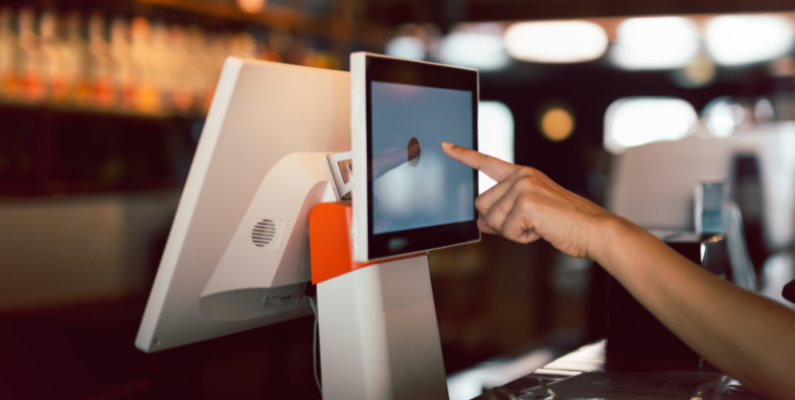
Implementing an online food ordering system requires an upfront investment in technology, software, and possibly staff training.
For example, restaurants may incur:
- Costs for integrating the ordering system with your restaurant website.
- Purchase or upgrade hardware, such as tablets, computers, or point-of-sales systems, to sync with the new ordering software.
- Train staff on managing online orders, updating the system with new menu items, and troubleshooting technical issues.
These upfront costs may dig deep into the pocket of a small restaurant with a tight budget. However, the costs vary widely depending on the provider and the scale of the ordering system you choose.
2. Ongoing maintenance and fees
One of the biggest drawbacks of third-party food delivery apps like Uber Eats, Doordash, Grubhub, etc., is that they charge commission fees on transactions.
📈 On average, restaurants make 30% of the transaction value of a delivery order. Unfortunately, the commission they pay per order received from online food delivery apps makes up 15% per transaction.
This means you’ll have to share your profits with these platforms.
In addition to commission rates, some online food delivery apps even charge transaction fees to cover payment processing costs. Some can charge ongoing maintenance costs for software updates, security patches, server hosting, etc.
If you factor in additional charges like service charges, pickup fees, marketing fees, customer support fees, etc., if any. These fees add up over time and eat into overall profit margins.
3. Technical challenges
Technical challenges in an online ordering platform can disrupt service and damage the customer experience. Common issues such as website downtime or software bugs can prevent customers from placing orders. Integration problems with POS systems or other restaurant software can complicate this process further.
For example, a system crash during peak hours could result in missed orders, incorrect charges, or service delays. Ultimately, this can lead to lost sales and customer frustration.
So, as a restaurant owner, ensure your system is reliable and easily integrates with existing in-house operations. This is critical if you want to offer smooth service and boost customer satisfaction.
4. Delivery logistics
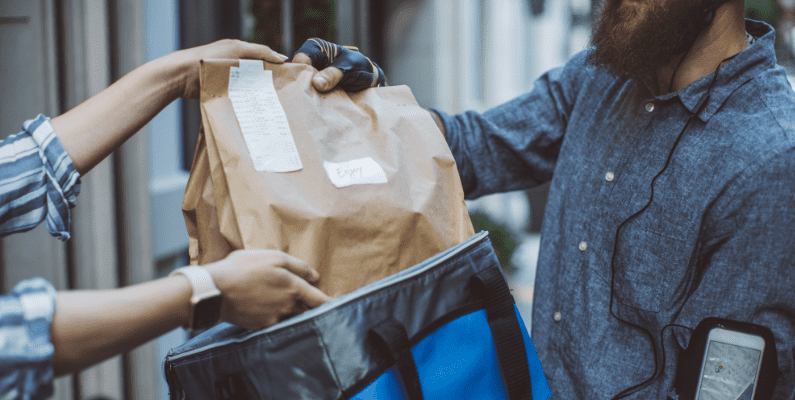
If a restaurant manages its food delivery service, it must handle logistics. This can be quite complex and expensive. It includes hiring and managing delivery staff, maintaining vehicles, planning delivery routes, and ensuring that orders are delivered on time. Poor logistics management can result in late deliveries, higher costs, and dissatisfied customers.
In contrast, using a third-party delivery service shifts these responsibilities to the delivery platform. But as we’ve seen, this often comes with added fees.
📈 70% of customers say they’d rather order and pay their money straight to their favorite restaurants and not to a third party.
With all these in mind, it’s time to find the best online food ordering system and set it up immediately on your WordPress site.
How to set up an online food ordering system?
Launching your food business successfully online requires a robust online ordering platform. One that lets you enjoy the benefits of online ordering above and reap even more in the long run. At the same time, it provides lower setup costs.
Here’s what to look out for:
- It doesn’t charge a commission per transaction (or other hidden costs), so you keep your profits.
- It easily integrates with your restaurant website.
📈 This is because more than 40% of customers now prefer to place delivery and takeout orders through your website or mobile app. Only 13% use third-party food delivery services.
- It is frequently updated to eliminate technical challenges.
- It streamlines food delivery logistics.
This is where the WordPress plugin Orderable comes in handy.
It isn’t only the best online ordering platform. It simplifies setup so you can launch your food business online as quickly as possible at an affordable price.
What is Orderable?
Orderable is a commission-free online food ordering system plugin built for WordPress.
It provides a range of features that enable you to manage restaurant orders, delivery, and pickup services directly through your WordPress site.
This means you can create a fully customizable online menu, handle payments, inventory, checkout, track orders in real-time, and offer flexible delivery or pickup options.
Orderable provides all the features you need to handle these operations (and more) seamlessly.
The benefits of using Orderable
The following are the benefits of using the Orderable WordPress plugin.
Easy setup and integration
When setting up Orderable, you enter your restaurant information. Then, set up the ordering process, add food items, create your online menu, and start fulfilling orders.
You can easily add various payment gateways like credit cards, digital wallets, cash on delivery, etc. Any payment method that works with WooCommerce, will also work with Orderable.
Create menus that put your customer first
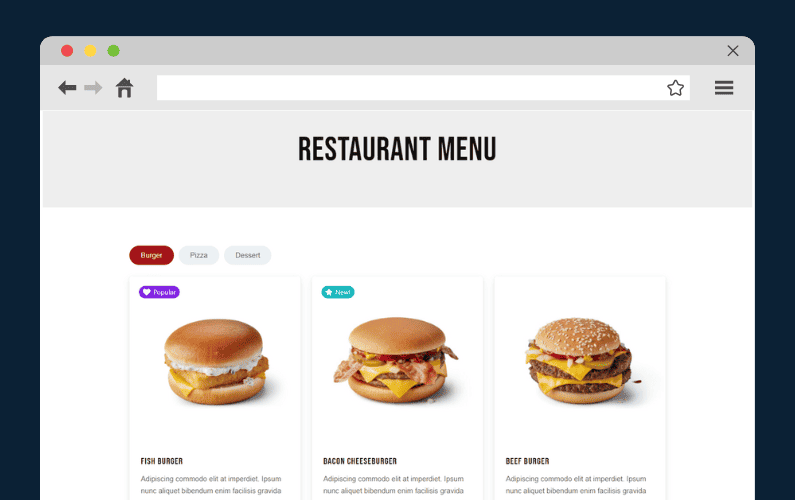
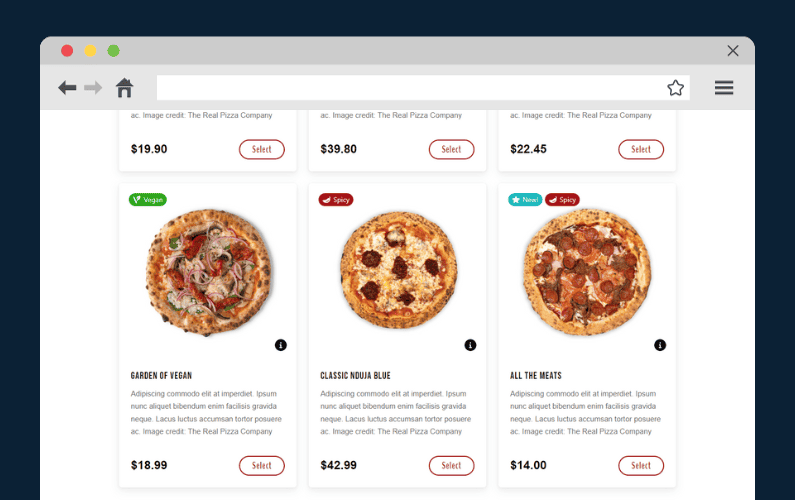
Orderable provides read-made menu layouts that are fully customizable. Restaurants can create a menu with product descriptions, high-quality images, prices, add-ons, product labels, allergen and nutritional info, etc.
- Dietary and promotional product labels. Product labels can be promotional, such as highlighting popular dishes, chef’s specials, etc. Or use labels to indicate dietary/allergen information or preferences in a dish such as vegan, kosher, halal, gluten-free, etc.
- Nutrional information. Add a table of nutritional information to your dish’s description by filling in some easy-to-use fields.
- Set up timed products. These products only appear on your menu for certain days of the week or times of the day. They’re perfect for breakfast/lunch menus.
Provide flexible delivery options for customers
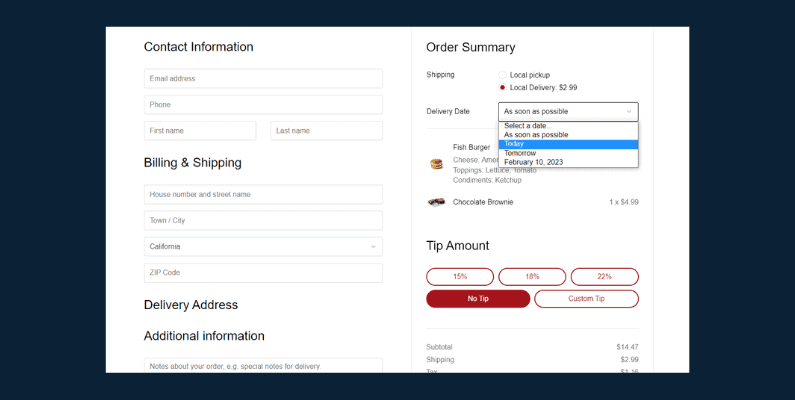
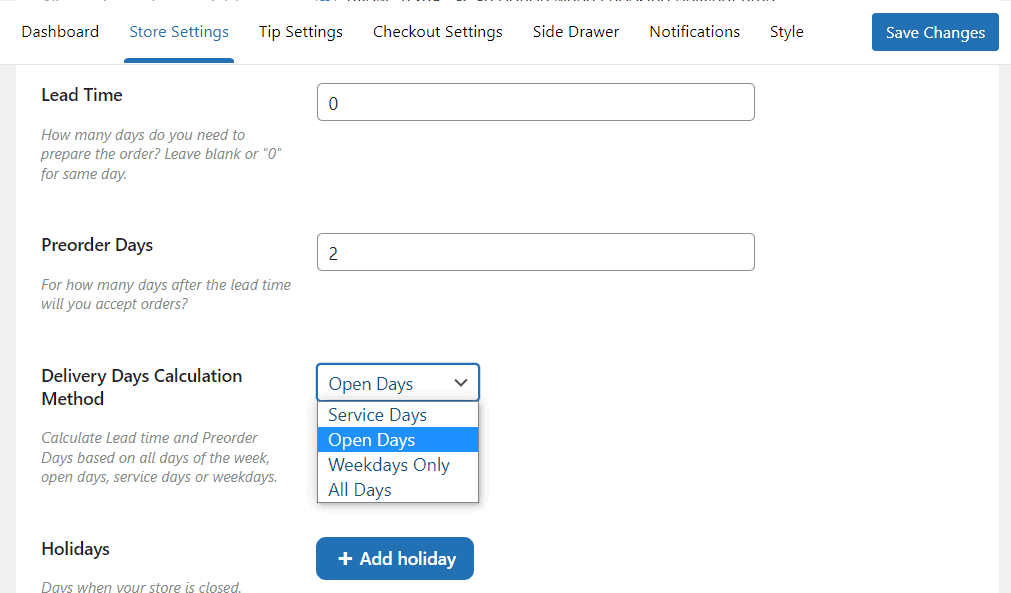
Orderable conveniently lets customers choose their preferred delivery or local pickup times and dates. But it’s the management that determines the delivery/pickup schedule by adding flexible timeslots.
Timeslots is a date picker or delivery calendar found at the checkout. Customers can use this to select an order delivery date and time. Then, refine it with maximum orders, holidays, ASAP delivery, lead time, preorder days, and more.
If you perfectly slot specific dates and times, you can increase customer satisfaction, increase sales, reduce failed deliveries, etc.

Real-time order management
Orderable provides a live order view system where you can view and manage orders in real-time. It captures accurate order details, including order number, date, status, customer name, address, total price, service, due date/time, special requests/preferences and instructions, and more.
If you have an emergency or run out of ingredients, you can pause/resume orders directly from the live order view screen.
In this manner, this system ensures a smooth process from kitchen prep to delivery.
Easily set up QR code table ordering
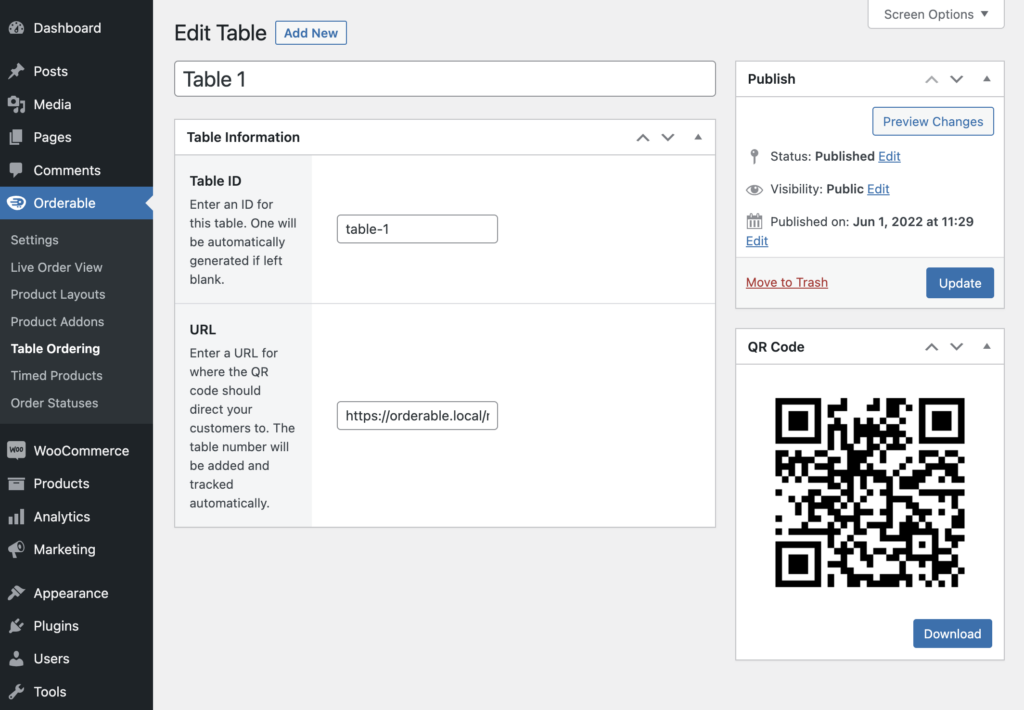
With Orderable, you can easily set up a tableside ordering system and provide a contactless dining experience for dine-in customers. They can use their smartphones to place orders by scanning QR codes on their tables. A customer’s order will be accurately assigned to their table.
Send automated order notifications
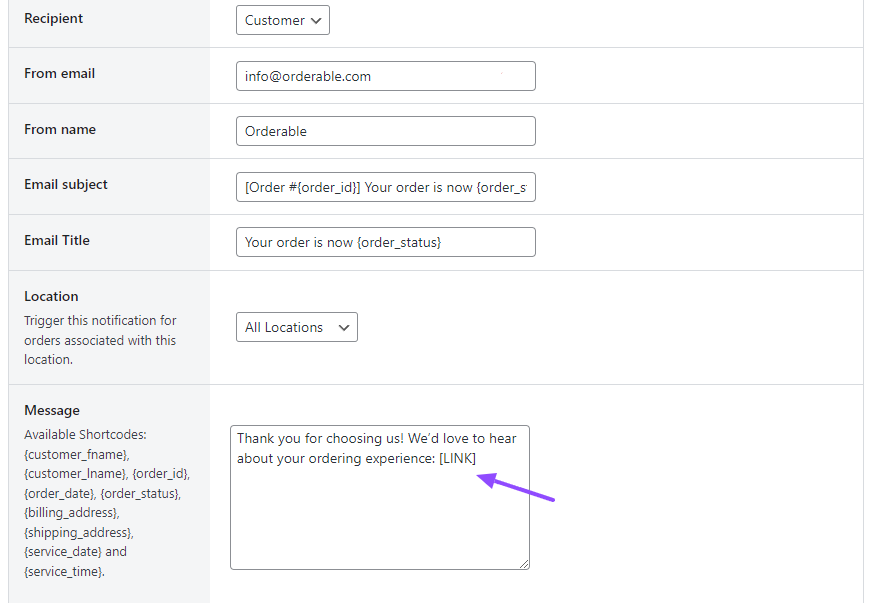
This plugin supports automated order notifications through SMS, email, or WhatsApp. This helps keep customers informed about their order status by sending customer order statuses you create. For example, order received, prepping, or ready for delivery.
But you can also send notifications to your staff and delivery personnel as well if an order is up. You can also send automated pickup/delivery email reminders to customers who haven’t picked their delivery slot yet.
Create multiple restaurant locations on one website
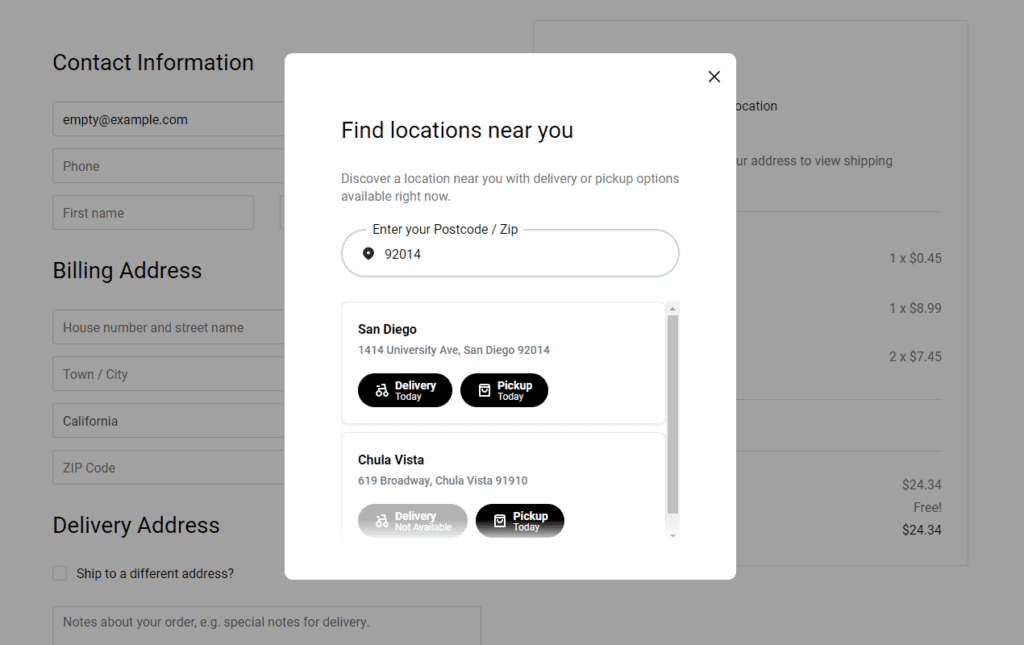
Orderable allows businesses with multiple locations to manage everything through one website. Since each restaurant location differs, the delivery zones, opening hours, delivery services, order screen, delivery times, and dates are also customizable.
It also includes a customer location selection. This lets customers select their closest location before shopping by searching for stores near them on your ordering app.
Boost sales with cross-selling and upselling
This plugin provides the following sales-boosting features to help you increase revenue:
- Checkout tipping. Add tip prompts at the checkout and increase your average order value. Customize default tip amounts or offer a custom tip as determined by the customer.
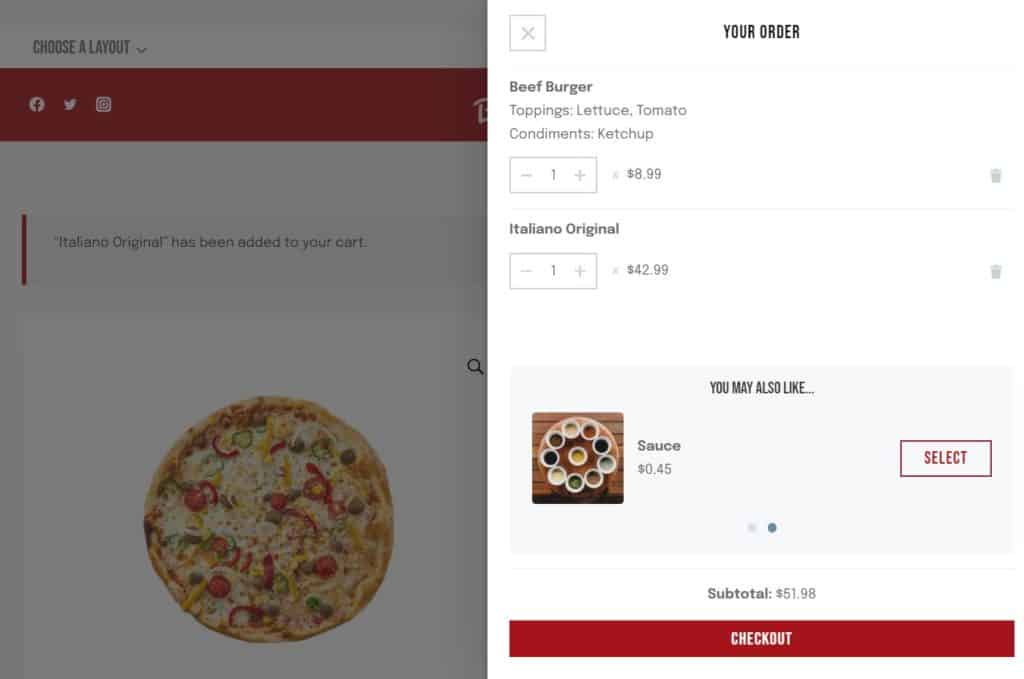
- Order bumps. This cross-selling feature encourages customers to buy by suggesting additional items, such as desserts or sauces, right in the floating cart widget.
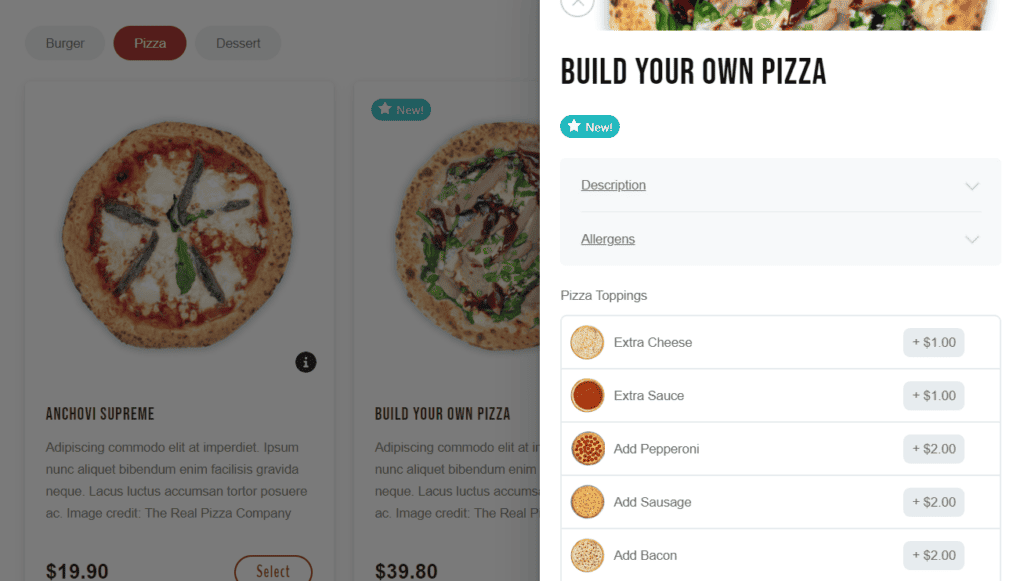
- Product add-ons. Offer add-ons such as toppings, sauces, and customization with Orderable Pro. Charge additional fees should you wish to.
Charging delivery fees can also boost sales. So, how do you set this plugin up and start fulfilling orders sooner?
How to set up Orderable
Setting up the Orderable plugin takes only four easy steps to finish.
Step 1: Download and install Orderable
The first step is to purchase Orderable and get it installed on your WordPress website like you would any other plugin.
Get Your Restaurant Business Online With Orderable
Orderable is a user-friendly WordPress plugin that adds online ordering to your restaurant website.
Add your dishes, create your online ordering menu, customize your delivery schedule, and manage orders with ease.
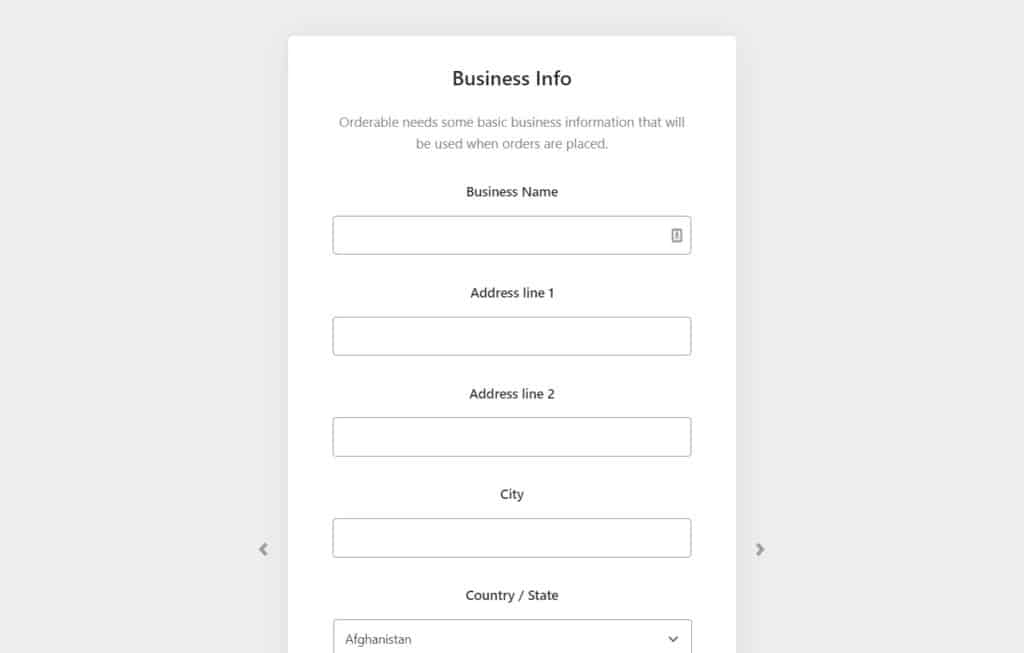
Step 2: Enter your restaurant information
Enter your restaurant’s details, such as name, address, contact information, and business hours. It ensures customers can easily find your business details. It also helps you enable deliveries and local pickup services.

Step 3: Add your food products and create an online menu
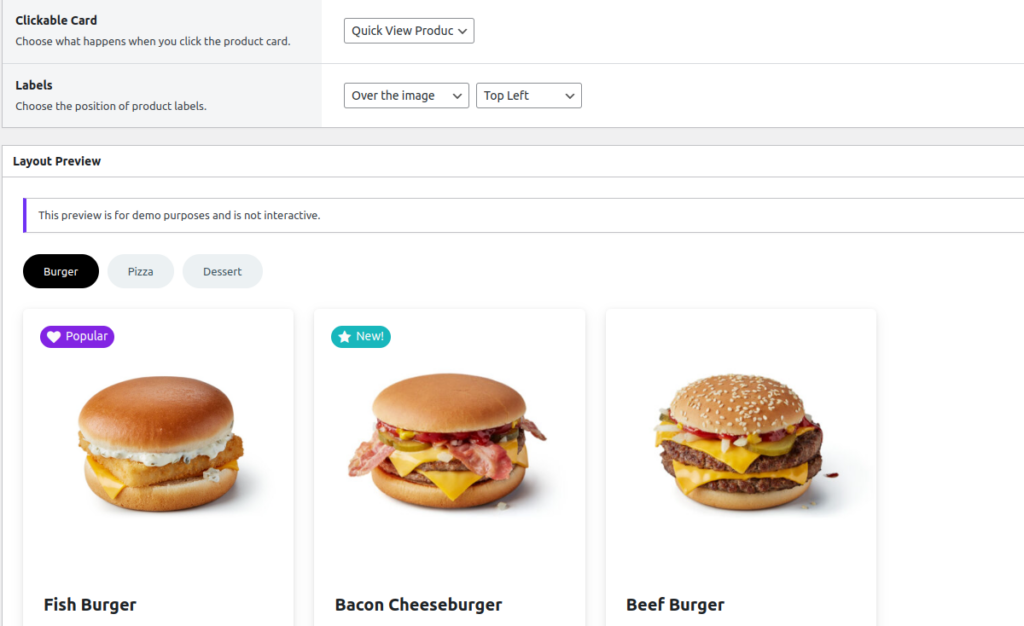
Orderable lets you create a customizable online menu that customers order from via your restaurant website on the front end. It includes adding menu items with descriptions, prices, and high-quality food photographs so customers know exactly what they’re getting.
Go to Products > Add New on your WordPress dashboard to add products like main course, sides, add-ons (such as toppings and sauces), and drinks.
Create product layouts and fill them up with your products in Orderable > Products layouts.
Step 4: Set up your ordering process
This step involves creating a custom delivery/local pickup schedule. Customize the ordering experience with curbside pickup, delivery, date slots at the checkout, holiday scheduling, and more. Because Orderable easily integrates with WooCommerce, you can customize everything from your payment methods (credit card, PayPal, Stripe, etc) to marketing tools.
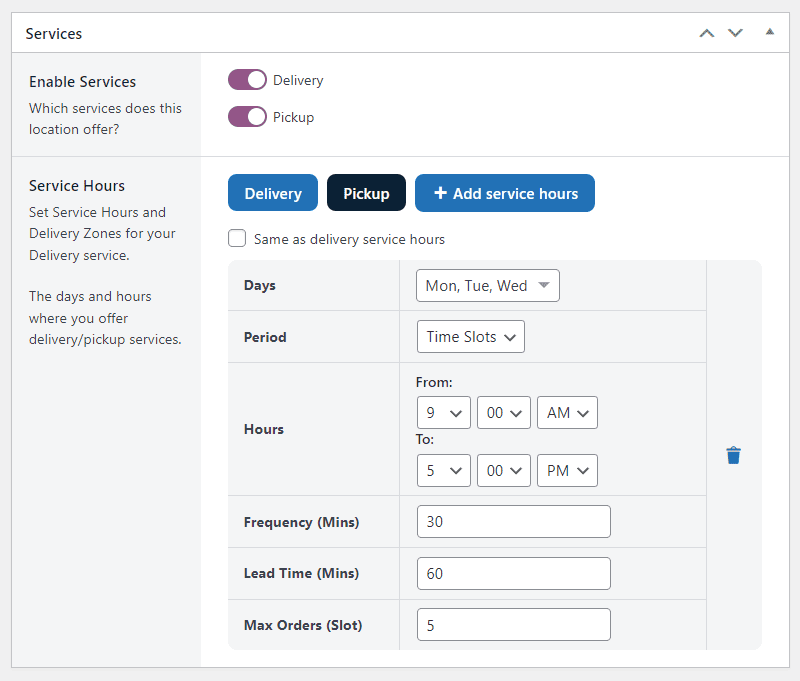
After all these steps, new customers can easily place orders through your ordering website. Everything, including payment processing, delivery fees, and inventory management, is taken care of.
Plus, you’ll be able to streamline restaurant operations and see/process orders via the real-time live order screen.
💡 If you would like to dive deeper, read our guide on setting up an online food ordering software using the Orderable plugin for more detailed steps.
Get started with your online food ordering system today
The benefits of setting up an online food ordering system are too much for you as a restaurant owner to pass up an opportunity to add it to your restaurant. First, it makes your restaurant business more accessible and improves your customer’s overall dining experience.
On the other side, it streamlines your operations, boosts sales, and provides valuable customer data. But, there are some cons you’ll have to face and overcome to set up and manage your own online food ordering system.
Orderable enables you to enjoy the full benefits and overcome the major drawbacks of having an online ordering system. This plugin provides you with all the features you need to take full control of your restaurant orders. It is affordable, easy to set up so you can start fulfilling orders soon, and it doesn’t charge commissions.
Get Orderable today to launch your food business online as soon as possible and win new customers.
Get Your Restaurant Business Online With Orderable
Orderable is a user-friendly WordPress plugin that adds online ordering to your restaurant website.
Add your dishes, create your online ordering menu, customize your delivery schedule, and manage orders with ease.
Gina Lucia is our in-house Content Manager at Orderable. She writes articles, user guides, technical documentation, and creates videos on everything WooCommerce and Orderable.
Gina has been working in the WordPress/WooCommerce space since 2012 when she developed WordPress websites for clients large and small.
For the past 8 years, she’s been writing about everything WordPress and WooCommerce, becoming an expert in what makes a WooCommerce store succeed.
When not writing, Gina loves to tend to her vegetable garden, read, or travel to mainland Europe.
Don’t miss out on the latest Orderable news!
Sign up for our newsletter to receive the latest news from the blog, you’ll get pinged every week with a digest of the latest updates.
[fluentform id=”6″]

Related Articles
New to Orderable: Updates for September 2022
WooCommerce Shipping Zones: How to Create and Manage
5 Online Restaurant Management Tips for 2026
Get Your Restaurant Online With Orderable
The WooCommerce plugin designed to help restaurants take orders online – with no added fees!
View Pricing

